Kinderseite: Installation und Deinstallation
Dieser Abschnitt bezieht sich auf den Client für Windows-Computer, die von Kindern täglich genutzt werden (im Gegensatz zur App, die Eltern auf ihren Handys installieren). Das Installationspaket wird von der offiziellen Website-Downloadseite heruntergeladen.
Diese Software berücksichtigt vollständig die Gesetze und Vorschriften verschiedener Länder zum Schutz Minderjähriger sowie die Bedenken der Eltern bezüglich der Computernutzung durch Kinder und Jugendliche. Daher wurden verschiedene Funktionen entwickelt, um die Privatsphäre und Sicherheit Minderjähriger zu schützen. Sie entspricht den Datenschutzbestimmungen der einzelnen Länder und sammelt, speichert oder nutzt keine privaten Informationen Minderjähriger.
Betriebsumgebung (aus der Anleitung entnommen)
| Projekt | Mindestanforderungen | Empfohlene Werte |
|---|---|---|
| Betriebssystem | Windows 10 64-Bit | Windows 10 64-Bit |
| Prozessor | Dual-Core 2.0 GHz | Quad-Core 2.5 GHz und höher |
| Arbeitsspeicher | 4 GB | 8 GB oder mehr |
| Festplattenspeicher | 200 MB verfügbar | Mehr als 1 GB (für einfache Screenshot-Speicherung) |
| Netzwerk | Internetverbindung erforderlich | Stabiles Breitband |
Installationsschritte
- Laden Sie das .zip Installationspaket von der offiziellen Website oder dem Installationsmedium herunter. Entpacken Sie die exe, um das Sicherheitspaket auszuführen, und doppelklicken Sie zum Starten.
- Doppelklicken Sie zum Ausführen; das Installationsprogramm unterstützt mehrere Sprachen, die Schnittstellensprache wird automatisch entsprechend der Windows-Systemsprache ausgewählt.
- Nach Abschluss der Installation startet die Software automatisch, die Hauptoberfläche oder das Taskleistensymbol erscheint.
- Beim ersten Start ist die Einrichtung eines mindestens 6-stelligen Verwaltungskennworts und die Angabe von Telefonnummer und E-Mail-Adresse erforderlich (bitte unbedingt korrekt angeben). Für das chinesische Festland wird in der Regel eine SMS zum Abrufen genutzt, in anderen Regionen eine E-Mail mit Bestätigungscode.
- Sie werden gefragt, ob Sie das mobile Verwaltungsterminal binden möchten; Sie können es sofort binden oder auch nicht. Wenn Sie die Eltern-App bereits heruntergeladen haben, klicken Sie auf das "+" in der App, um den Bindungscode zu erhalten, und geben Sie ihn am Computer ein, um die Bindung abzuschließen. Wenn Sie die Eltern-App noch nicht installiert haben, können Sie zunächst die lokalen Regeln auf diesem Computer einrichten. Sobald die Eltern-App installiert und mit dem Konto verbunden ist, können Sie die Einstellungen auf Ihrem eigenen Gerät fernsteuern.
- Bitte folgen Sie den Anweisungen, um beim ersten Start der Version 1.0 den Grafikkartentest abzuschließen (siehe unten "Grafikkartenerkennung und Live-Streaming-Überwachung"), damit die mehrdimensionale Überwachung und Live-Szenenerkennung genauer sind. Seit Version 1.1 wurde die Grafikkartenerkennungsfunktion zur einfacheren Bedienung in die Software integriert, ein separater Vorgang ist nicht mehr erforderlich.
Deinstallationsmethode
- Die Deinstallation ist auch über die Windows „Einstellungen“ → „Apps“ möglich.
- Klicken Sie unten links auf der Software-Oberfläche auf "Software-Deinstallation" und folgen Sie dem Assistenten, um die Deinstallation abzuschließen.
Eltern-App (kurz)
Eltern werden gebeten, die Verwaltungs-App auf ihrem eigenen Handy zu installieren (unterschiedlich zum Programm auf dem Computer des Kindes). Scannen Sie den Code oder laden Sie sie aus dem App Store herunter, registrieren Sie sich und melden Sie sich an; Details finden Sie in den "Eltern-App Anweisungen" weiter unten auf dieser Seite.
Gerätebindung und Systemeinstellungen
Gerätebindung und -verwaltung
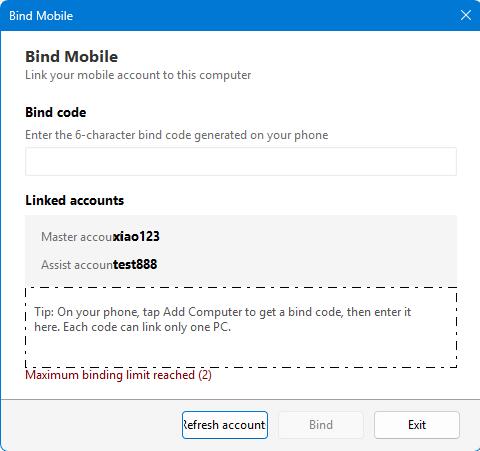
Von der Eltern-App wird ein 6-stelliger dynamischer Bindungscode generiert. Nach der Eingabe auf dem Computer des Kindes wird eine Vertrauensbeziehung hergestellt. Sobald die Verbindung hergestellt ist, können Eltern den Online-Status aus der Ferne einsehen, Benachrichtigungen erhalten und Kontrollmaßnahmen ergreifen. Pro PC können bis zu zwei Handys gebunden werden; das zuerst verknüpfte Konto ist das Hauptkonto, hinzugefügte Konten sind Zweitkonten.
Schritte
- Klicken Sie in der Eltern-App auf "Computer hinzufügen", um den Bindungscode zu erhalten.
- Klicken Sie auf der Hauptoberfläche des Kindergeräts auf "Handy binden".
- Geben Sie den Bindungscode ein und klicken Sie auf "Binden".
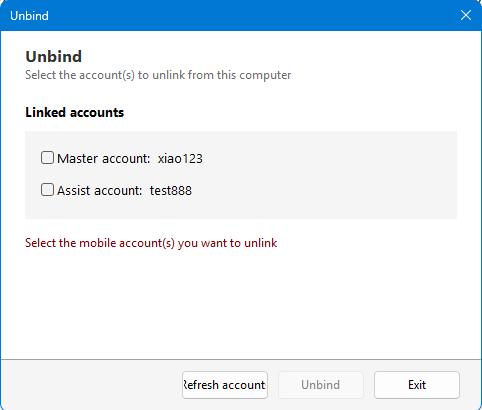
- Wenn Sie die Bindung aufheben müssen, gehen Sie zum Bildschirm "Bindung aufheben", geben Sie das Kennwort ein und klicken Sie auf "Bindung aufheben".
- Der Bindungscode ist zeitlich begrenzt, bitte führen Sie den Vorgang innerhalb der Gültigkeitsdauer durch.
- Nach dem Aufheben der Bindung wird der Computer nicht mehr von der App fernbedient, aber die lokal gespeicherten Richtlinien bleiben erhalten.
Systemeinstellungen
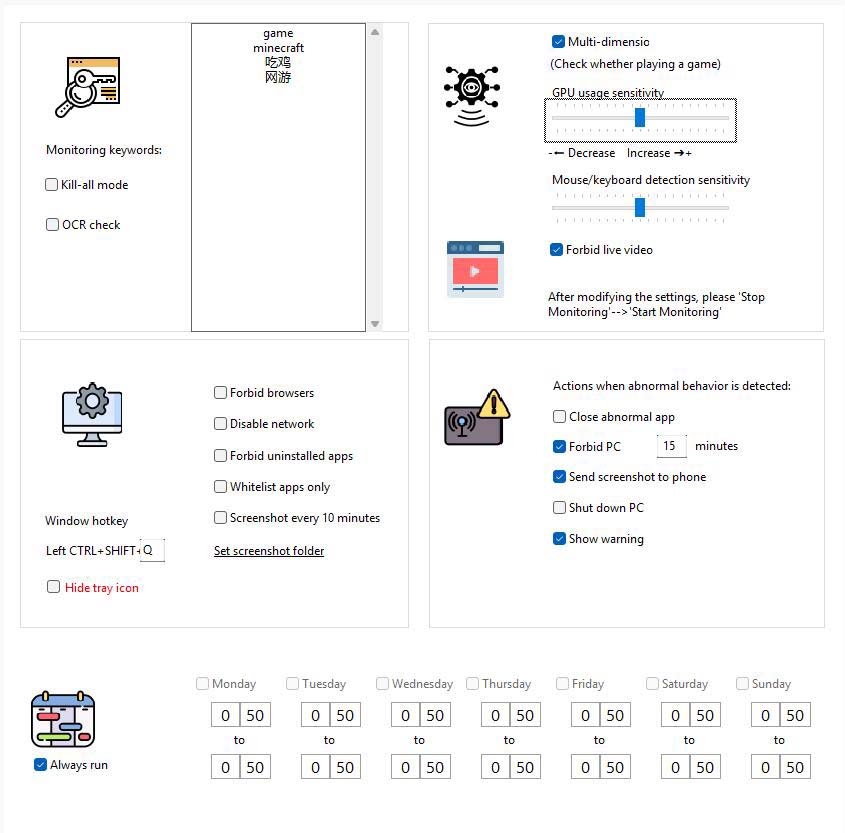
Konfigurieren Sie hier die globalen Überwachungsrichtlinien: Schlüsselwörter, OCR, mehrdimensionale Überwachung, Aktionen bei Anomalien, Netzwerk-/Browserbeschränkungen, zeitgesteuerte Screenshots, Taskleistensymbol usw.
Wichtige Punkte der Oberfläche (aus der Anleitung entnommen)
- Überwachung von Schlüsselwörtern: Fenstertitel oder Bildschirmtext, der überwacht werden soll (z. B. „Spiel“, englische Spielnamen usw.).
- Kill-Modus: Schlüsselworterkennung für alle Fenster (Ausnahmen von der Whitelist sind nicht ausgenommen).
- OCR-Test: Regelmäßige Texterkennung in einem Bildschirmbereich in der Nähe der Maus und Vergleich mit Schlüsselwörtern.
- Mehrdimensionale Überwachung: Kombiniert Grafikkartennutzung und Benutzerverhalten zur Erkennung von Spielaktivität; häufig genutzte Lern- und Büroprogramme sollten zur Whitelist hinzugefügt werden, um Fehlalarme zu vermeiden.
- Tastatur- und Mausempfindlichkeit: Stellt die Empfindlichkeit der Verhaltensanalyse ein.
- KI-Erkennung von Live-Streaming-Nutzung: Blockiert Live-Gaming-Apps. Hinweis: Diese Funktion ist aufgrund der geringen Systemauslastung recht komplex zu implementieren, es besteht derzeit die Möglichkeit von Fehlberechnungen. In unseren Tests werden mehr als 95% der Live-Streams als normal erkannt, aber ein sehr kleiner Teil normaler Vorgänge könnte fälschlicherweise als Live-Stream erkannt werden. Bitte schalten Sie diese Funktion je nach Bedarf ein oder aus.
- Aktion bei erkanntem Fehlverhalten: z. B. Schließen abnormaler Anwendungen, Sperren des Computers, Senden von Screenshots an das Handy, Herunterfahren usw.; Sie können auswählen, ob eine Warnung angezeigt werden soll. Wenn keine Warnung angezeigt wird, werden bei Erfassung abnormalen Verhaltens direkt Kontrollaktionen ausgeführt. Wenn eine Warnung angezeigt wird, wird der Benutzer darauf hingewiesen und die Kontrollaktion wird nach Ablauf des Countdowns ausgeführt.
- Nur Whitelist-Software: Wenn aktiviert, dürfen nur Programme in der Whitelist ausgeführt werden.
- Taskleistensymbol nicht anzeigen / Netzwerk deaktivieren / Browser deaktivieren / Zeitgesteuerte Screenshots: Je nach den tatsächlichen Bedürfnissen der Familie ankreuzen; das Screenshot-Verzeichnis kann in den Einstellungen festgelegt werden.
Schritte
- Gehen Sie zu den Systemeinstellungen.
- Füllen Sie nach Bedarf Schlüsselwörter aus, wählen Sie die Überwachungsoptionen aus, stellen Sie die Empfindlichkeit und die Aktionen bei Anomalien ein.
- Klicken Sie auf "Einstellungen speichern", um sie zu übernehmen; klicken Sie auf "Überwachung stoppen", um sie vorübergehend zu unterbrechen.
Verwaltungsvorschläge
Erstellen Sie ein Standard-Windows-Benutzerkonto für Ihr Kind
Wenn Ihr Kind bereits über fortgeschrittene Computerkenntnisse verfügt und sich dem Niveau eines Profis nähert, könnte es versuchen, Ihre Kontrollen auf verschiedene Weise zu umgehen. Sie können ein Windows-Standardbenutzerkonto für Ihr Kind erstellen und selbst das Windows-Administratorkonto verwenden. Dies gibt Ihnen mehr Kontrolle über die Computernutzung Ihres Kindes.
Zeitplan, Websites, Listen & Protokolle
Listenverwaltung (Whitelist)
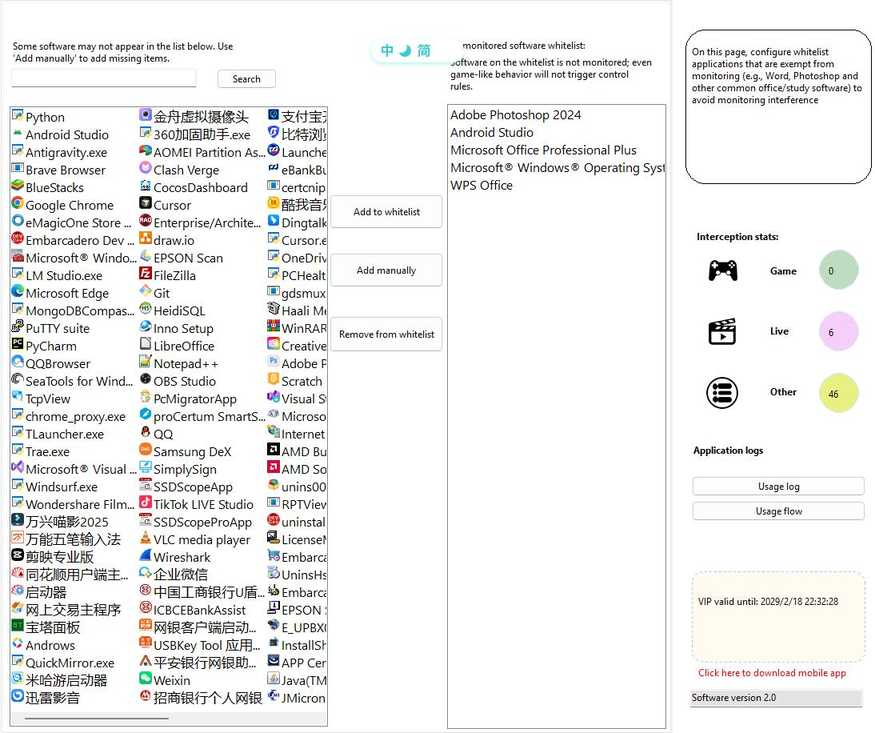
Software in der Whitelist wird nicht als Spielsoftware erkannt; geeignet zum Hinzufügen gängiger Lern- und Büroprogramme.
- Gehen Sie zur Listenverwaltung.
- Suchen: Das Suchfeld filtert die bereits vorhandene Whitelist.
- Hinzufügen: Wählen Sie aus der Kandidatenliste aus, geben Sie den Softwareramen manuell ein oder wählen Sie über "Eigene hinzufügen" die .exe-Datei aus.
- Löschen: Löschen Sie einen Eintrag in der linken Liste oder doppelklicken Sie zum Löschen.
- Ihre Änderungen werden beim Speichern oder beim Wechseln der Seite wirksam.
Computer-Nutzungszeitplan
Legt die Verfügbarkeitszeiten für den gesamten Computer fest; außerhalb der verfügbaren Zeiten kann die Oberfläche gesperrt und die weitere Nutzung verhindert werden.
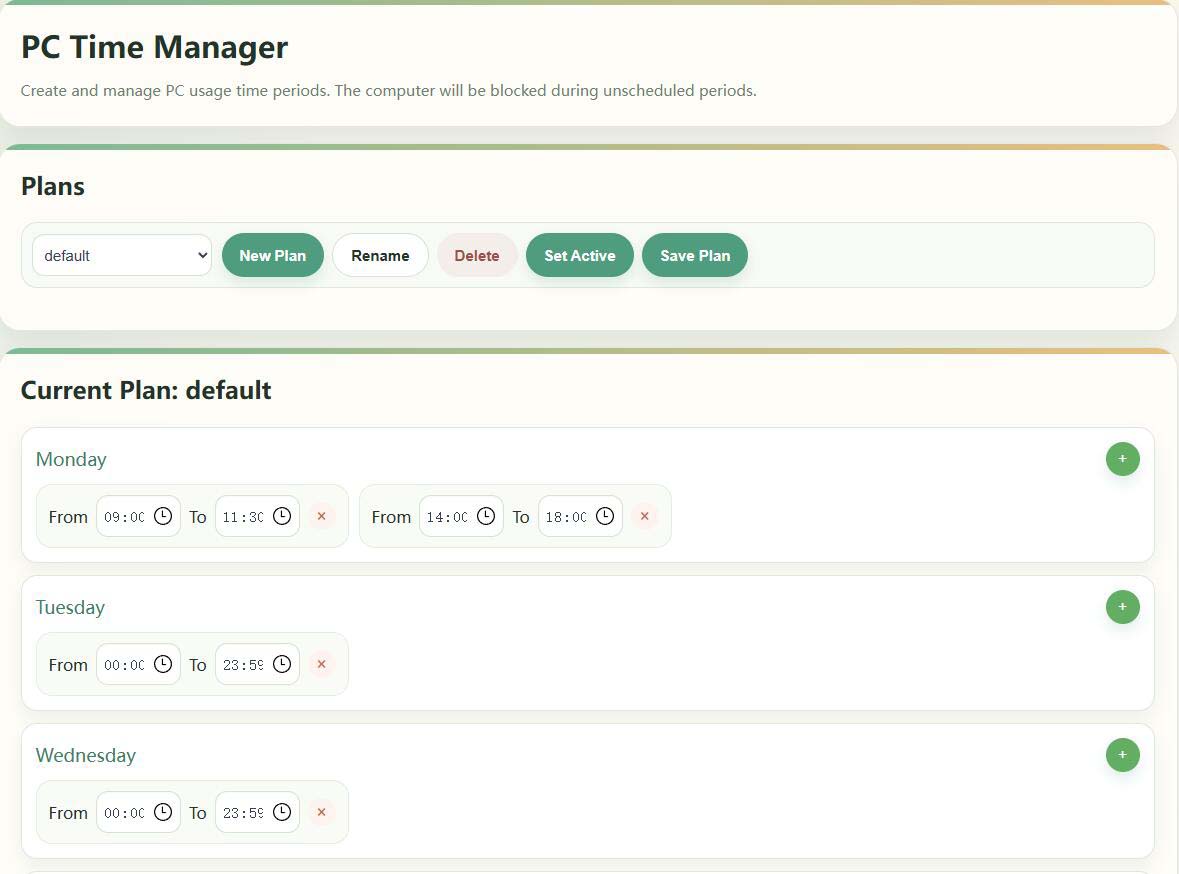
- Gehen Sie zum Computer-Nutzungszeitplan.
- Erstellen/Umbenennen/Löschen Sie einen Zeitplan im Zeitplan und setzen Sie ihn auf Aktiv (zeigt „Aktiv“ an).
- Legen Sie die verfügbaren Zeiten für mehrere Stunden pro Wochentag fest, die nach dem Speichern wirksam werden.
Für eine vorübergehende Freigabe können Sie die "Überwachung stoppen" auf dem Computer oder Handy verwenden; wenn der Bildschirm vor der Sperrzeit nicht gesperrt wird, überprüfen Sie bitte den aktuellen Aktivierungsplan und die Systemzeit (siehe FAQ in der Anleitung).
Software-Nutzungszeitplan
Für bestimmte Software legen Sie ein separates Zeitfenster fest, in dem sie ausgeführt werden darf (z. B. Spiel-Client nur zu bestimmten Zeiten am Wochenende).
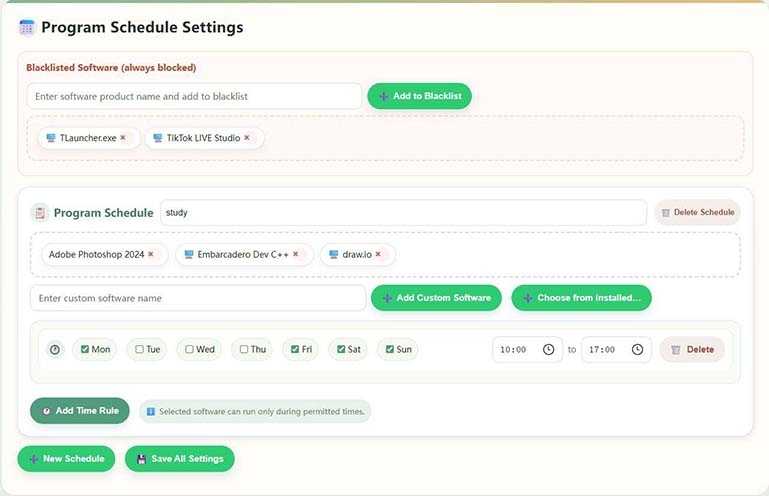
- Gehen Sie zum Software-Nutzungszeitplan.
- Aktivieren Sie die Programme, die Sie kontrollieren möchten, unter "Installierte Software" (Sie können mehrere auswählen).
- Durch Hinzufügen von Wochentagen sowie Start- und Endzeiten zu den Programmeinstellungen des Kalenders können Sie für dieselbe Software mehrere Regeln festlegen.
- Wenn die Zielliste nicht vorhanden ist, können Sie entweder "Benutzerdefinierten Softwareramen eingeben" oder die .exe / Produktname Beschreibung hinzufügen.
- Klicken Sie abschließend auf "Einstellungen speichern". Software auf der Whitelist ist von dieser Einschränkung ausgenommen.
Domainverwaltung (Zugriffskontrolle für Websites)
Verwalten Sie zugängliche Websites: Integrierte kategorisierte Bibliotheken für Spiele/Videos, unterstützt vollständige Sperrung oder Zugriffsbeschränkung nach Zeitregeln.
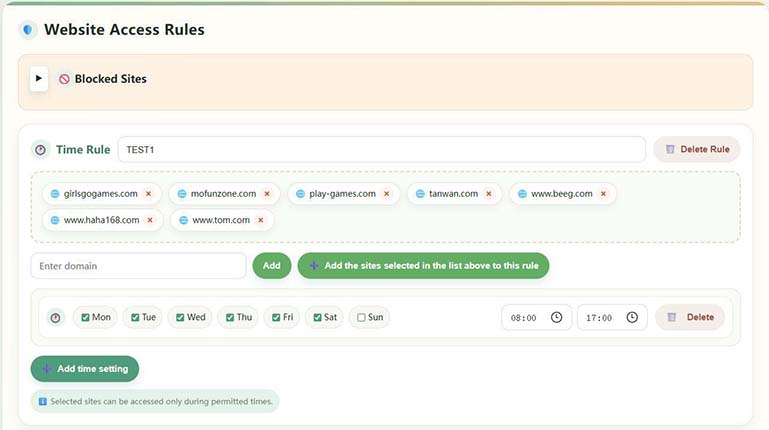
- Gehen Sie zur Domainverwaltung.
- Durchsuchen Sie die integrierten Kategorien und benutzerdefinierten Websites auf der linken Seite und filtern Sie mit Schlüsselwörtern.
- Wenn keine voreingestellte Domain vorhanden ist, verwenden Sie "Benutzerdefinierte Website hinzufügen".
- Speichern Sie, nachdem Sie Vollständige Sperrung oder Zeitregel konfiguriert haben; Seiten innerhalb dieser Regel können nur zu den genehmigten Zeiten geöffnet werden.
Integrierte gängige Spieleseiten für eine schnelle Konfiguration; geben Sie bei der individuellen Anpassung den vollständigen Domainnamen ein.
Grafikkartenerkennung und Live-Streaming-Überwachung
Wird verwendet, um eine Basislinie der GPU-Auslastung zu erstellen und die Erkennungsgenauigkeit von Spielen/Live-Streams mit hoher Last zu verbessern; Nach der ersten Installation oder dem Austausch der Grafikkarte wird eine einmalige Durchführung empfohlen.

- Gehen Sie zu den Grafiktests.
- Füllen Sie das Feld "Geben Sie den Namen der Live-Site ein" mit den häufig verwendeten Live-Stationen (wie Tiger Teeth, etc.) aus.
- Durch Klicken auf "Einrichtung starten" kalibriert das System die GPU; führen Sie während des Vorgangs keine anderen Programme mit hoher Grafikauslastung aus.
- Der Vorgang dauert etwa 2-3 Minuten und zeigt dann einen Erfolg an.
Anwendungsprotokollierung und Screenshot-Ansicht
Zeigen Sie die Nutzungsdauer jeder Software, die Anzahl der Starts, das Zeitachsen-Flussdiagramm und (falls aktiviert) die automatischen Screenshots an, um eine spätere Überprüfung zu erleichtern.
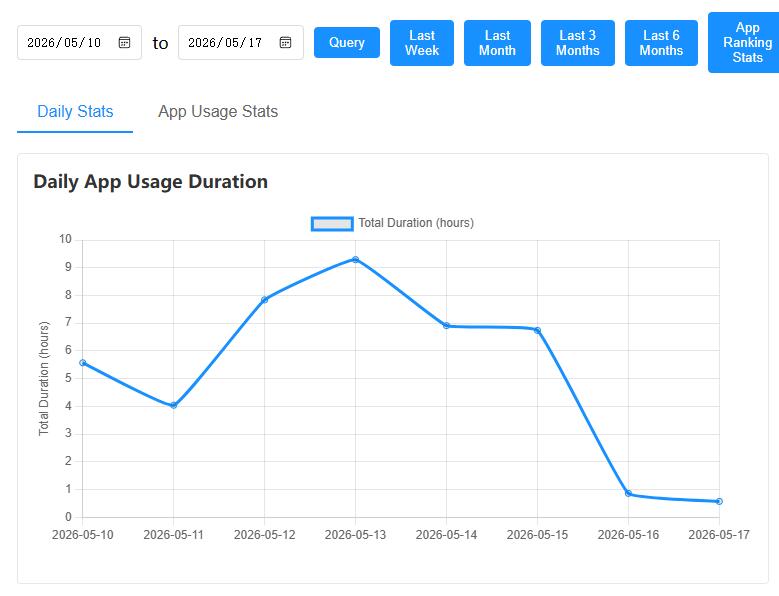
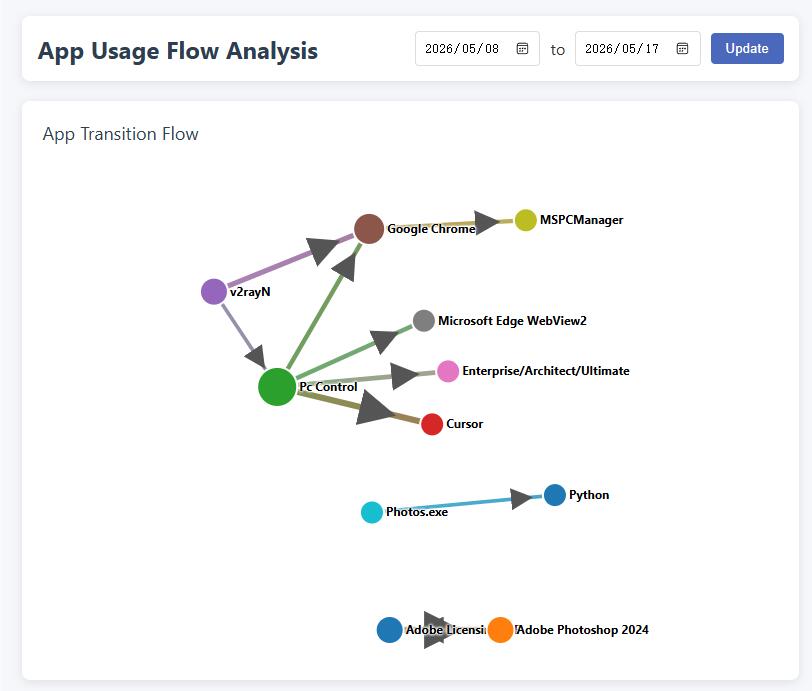
- Software-Nutzungsaufzeichnung: Zeigen Sie Statistiken unter Anwendung → Verlauf Software-Nutzungsverlauf an.
- Nutzungsflussdiagramme: Zeigen Sie Anwendungswechsel und Verknüpfungen entlang der Zeitachse an.
- Screenshots durchsuchen: Automatische Screenshots müssen in den Systemeinstellungen aktiviert werden; das Verzeichnis ist anpassbar, es wird empfohlen, es regelmäßig zu bereinigen, um Festplattenspeicher zu sparen.
Kontosicherheit & Mitgliedschaft (Desktop)
- Kennwort ändern: Gehen Sie zu "Kennwort ändern"; das Vergessen wirkt sich auf sensible Vorgänge wie die Bindungslösung aus.
- Mitgliedsinformationen Das VIP-Ablaufdatum kann im Bereich "Registrierungsinformationen" der Hauptoberfläche eingesehen werden; nach Ablauf können einige erweiterte Funktionen eingeschränkt sein.
- Download auf Ihr Handy: Klicken Sie auf "Hier klicken, um die mobile App herunterzuladen", um die Eltern-App zu erhalten.
- Bindung aufheben Siehe "Gerätebindung" oben.
Eltern-App Anleitung
Die folgend beschriebene App wird auf dem eigenen Handy der Eltern installiert und dient als Verwaltungsseite in Verbindung mit der Kinderseite auf dem Computer; komplexe Regeln können auch in der lokalen Verwaltungsoberfläche des Computers konfiguriert werden.
Der Anleitungstext bezieht sich auf die "Gebrauchsanweisung für die Little Lamb Anti-Sucht App" im Copyright-Dokument; die Oberfläche kann von der tatsächlichen Version abweichen.
A. Software-Übersicht
Diese App hilft Eltern, die Computernutzung ihrer Kinder auf ihren Handys aus der Ferne zu verstehen und zu verwalten: Screenshots anzeigen, Zeiträume festlegen, Websites und Schlüsselwörter kontrollieren, Warnungen erhalten usw. Die PC-Seite muss auf dem vom Kind genutzten Computer installiert sein und eine Internetverbindung haben.
Datenschutzhinweis Die Daten des PCs und dieser App werden hauptsächlich auf Ihrem eigenen Gerät gespeichert, das System überträgt Ihre persönlichen privaten Inhalte nicht auf die Server des Betreibers. Die Idee der Peer-to-Peer-Kommunikation zwischen Handy und Computer ist sicherer.
Schlüsselfunktionen
- Gerätebindung und -verwaltung: Hinzufügen und Verwalten gebundener Computer
- Echtzeitanzeige: Siehe Computer-Screenshots zur Nutzung
- Zeitkontrolle: Nutzungsdauer, Zeitplan und Zeitverwaltung
- Inhaltskontrolle: Website- und App-Regeln, Schlüsselwörter und Verhaltensüberwachungsverknüpfung
- Nachrichtenzentrum: Empfangen von Kontrollereignissen und Systemnachrichten
- Statistikbericht: Nutzungsdauer und Anwendungsnutzungsübersicht, rechtzeitiges Eingreifen zur Kontrolle
- Temporäre Kontrolle: Herunterfahren, Zeitplanung, Fernsperren, Screenshots usw.
II. Kurzanleitung
2.1 Benutzerregistrierung
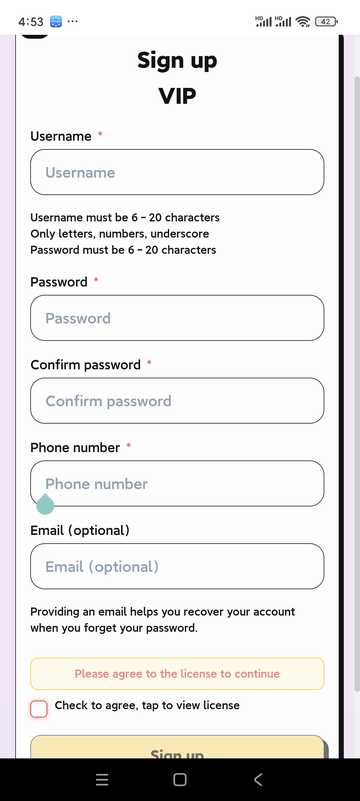
- Öffnen Sie die App und klicken Sie auf "Registrieren"
- Füllen Sie Benutzernamen, Kennwort und andere Informationen aus
- Lesen Sie die Nutzungsbedingungen und die Datenschutzrichtlinie und stimmen Sie ihnen zu
- Klicken Sie auf Registrieren, um die Kontoerstellung abzuschließen
- Benutzer in Festlandchina müssen sicherstellen, dass ihre Telefonnummer korrekt ist, um ihr Kennwort wiederherstellen zu können; Benutzer in anderen Ländern können ihre Telefonnummer leer lassen, müssen aber sicherstellen, dass ihre E-Mail-Adresse korrekt ist! Diese E-Mail-Adresse wird dann zum Abrufen des Kennworts verwendet.
2.2 Benutzeranmeldung
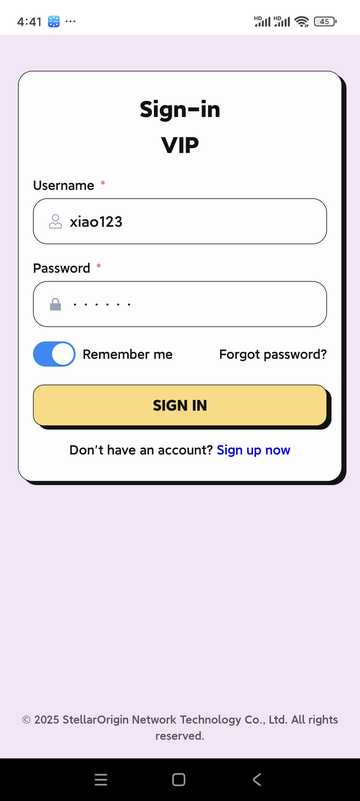
- Geben Sie Benutzername und Kennwort ein
- Option "Kennwort merken" für die nächste Anmeldung
- Klicken Sie auf "Anmelden", um die App zu starten
III. Startseite und Geräteverwaltung
3.1 Start
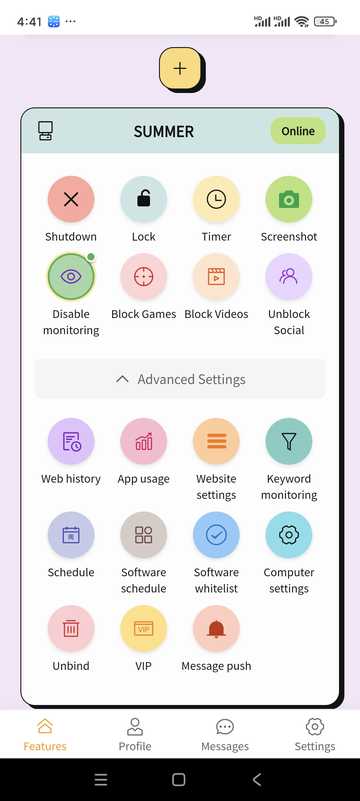
- Verwalten oder hinzufügen gebundener Geräte
- Online-Status des Geräts anzeigen
- Schnellzugriff auf häufige Funktionen (Herunterfahren, Sperren, Screenshot, Zeitplan usw.) über das Funktionsfeld
3.2 Geräte hinzufügen
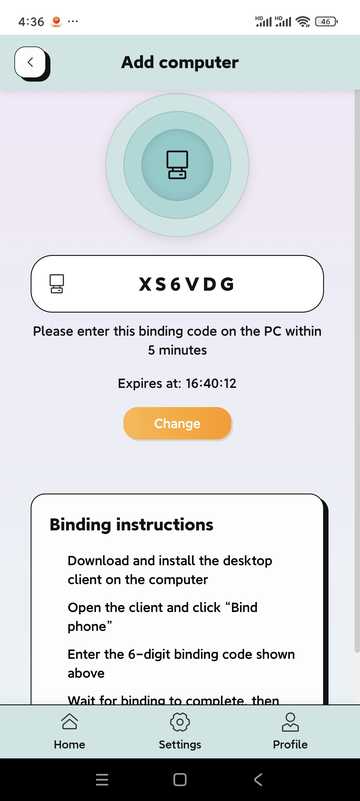
- Klicken Sie auf der Startseite auf "Gerät hinzufügen" oder "+"
- Das System generiert einen 6-stelligen Bindungscode (Beispiel: 5R5W2V)
- Installieren und öffnen Sie auf dem Computer Ihres Kindes die Desktop-Software und klicken Sie auf "Handy binden"
- Geben Sie den obigen Bindungscode auf der Computerseite ein
- Warten Sie, bis die Verknüpfung erfolgreich ist, um den PC über das Handy zu verwalten
3.3 Computereinstellungen (einige Optionen)
Netzwerk-/Browserbeschränkungen, OCR, Verhaltensüberwachung und Aktionen nach Auslösung können für gebundene Computer konfiguriert werden (entsprechend den PC-seitigen Richtlinien).
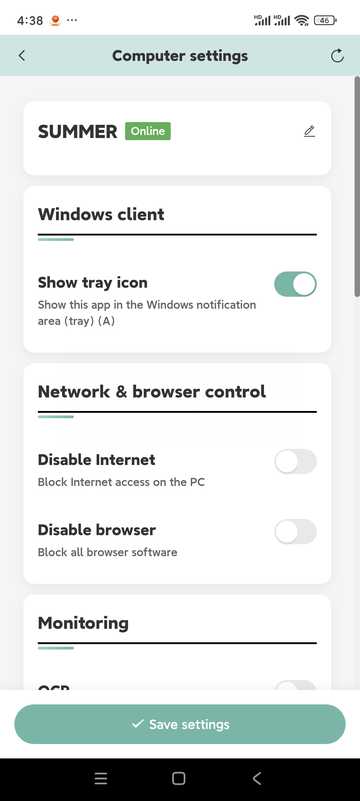
- Kein Internet / Kein Browser
- OCR-Erkennung (in Verbindung mit Schlüsselwortkontrolle; etwa alle 5 Sekunden)
- Verhaltensüberwachung (integriert Tastatur, Maus, Grafikkarte usw. zur Beurteilung von Spielverhalten)
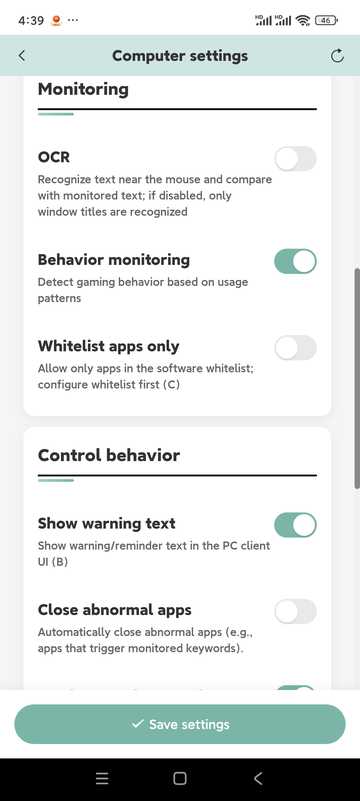
- Abnormale Apps schließen, Screenshots an Telefon senden
- Computer sperren, Computer herunterfahren
- Augenschutzmodus (Zeitüberschreitung erzwingt Pause)
- "Punktemodus" ist reserviert, in der aktuellen Version nicht aktiviert
IV. Zeitplanung · Fernsperre · Screenshots
Zeitgesteuerte Nutzung
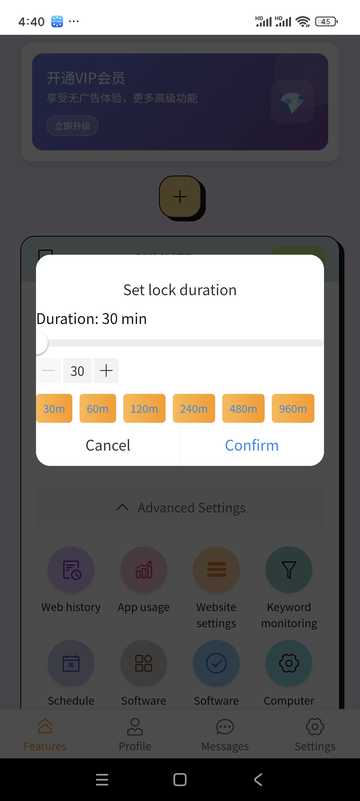
- Gerät auswählen
- Zulässige Nutzungsdauer einstellen
- Bei Aktivierung wird gesperrt oder gemäß Richtlinie verfahren
Fernsperre
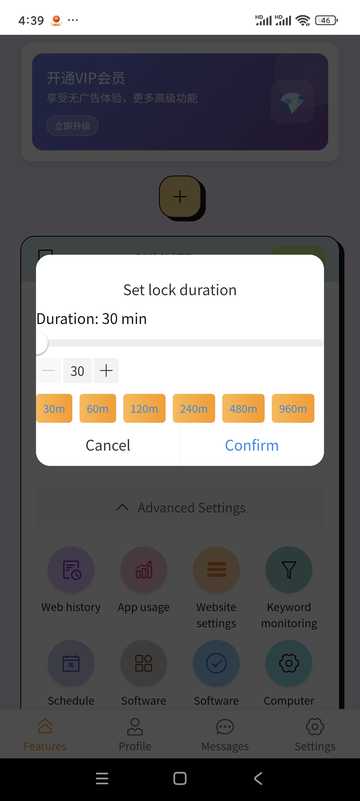
- Zeitgesteuert sperrbar
- Bei Bedarf in der App aus der Ferne entsperren
Computer-Screenshots
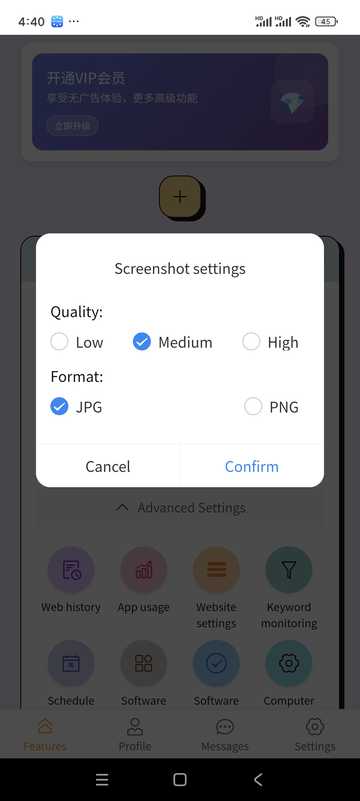
- Tippen Sie auf "Screenshot"
- Aktuellen Bildschirm anzeigen
- Kann auf Ihrem Telefon gespeichert werden
V. Zeitplan · Anwendungsaufzeichnung · Schlüsselwörter · Website
Computer-Zeitplan
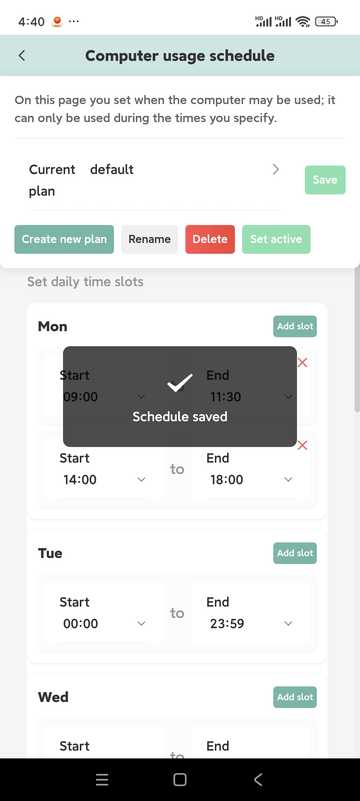
- Tägliche verfügbare Stunden einstellen, außerhalb dieser Zeiten wird automatisch gesperrt
- Mehrere Zeitfenster können am selben Tag konfiguriert werden
- Nach Wochentag trennbar
- Mehrere Pläne können erstellt und einer davon bei Bedarf aktiviert werden
App-Protokolle
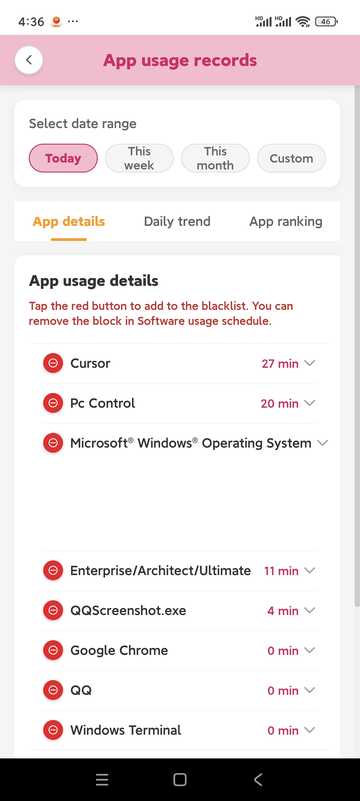
- Sehen Sie, wie lange und wie oft die App genutzt wurde
- Kann mit Aufzeichnungsverschärfungsstrategie kombiniert werden
Schlüsselwortüberwachung
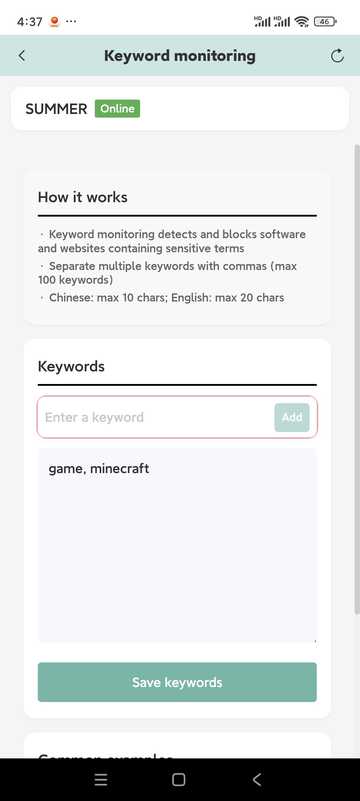
- Überwachte Schlüsselwörter hinzufügen
- Die maximale Länge beträgt etwa 10 Zeichen auf Chinesisch und etwa 20 Zeichen auf Englisch (abhängig von den Hinweisen in der Software)
- Schlüsselwörter müssen im Fenstertitel erscheinen, um leicht auszulösen; um den Bildschirmtext zu erkennen, verwenden Sie bitte die OCR in den Computereinstellungen
- Lokal erkennen und das Risiko von Datenschutzverletzungen verringern
Website-Einstellungen
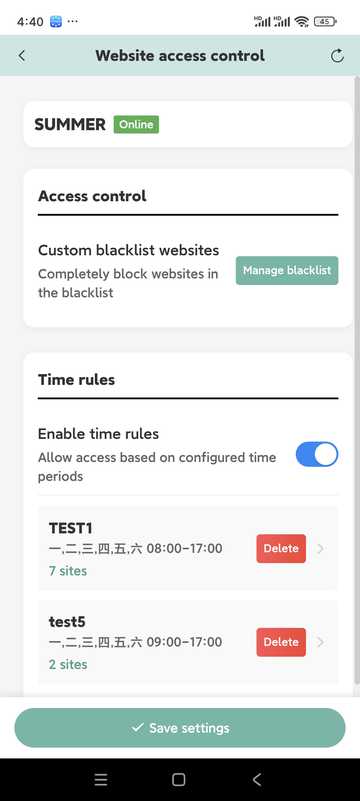
- Verwalten Sie schwarze Listen und Zugriffszeiten
- Kann ähnliche Seiten in derselben Zeitregel einschließen
- Wenn die Kontrolle abnormal ist, prüfen Sie, ob der PC von der Sicherheitssoftware blockiert wird, und geben Sie ihn frei
VI. VIP-Informationen
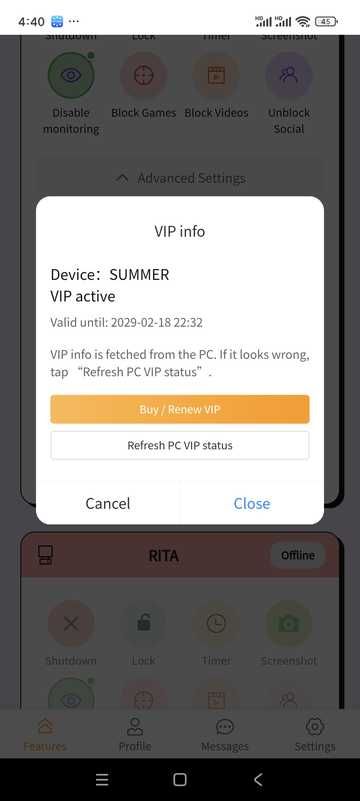
- Sehen Sie Ihre aktuelle Stufe und wann sie abläuft
- Wählen Sie die entsprechende Zeitdauer auf der Paketseite und schließen Sie die Zahlung ab (basierend auf der in der Software integrierten Zahlungsmethode)
Die Preisbeschreibung finden Sie auch im Bereich "Preisbeschreibung" auf der Startseite dieser Website.
VII. Persönliches Zentrum · Nachrichten · Einstellungen
Persönliche Informationen
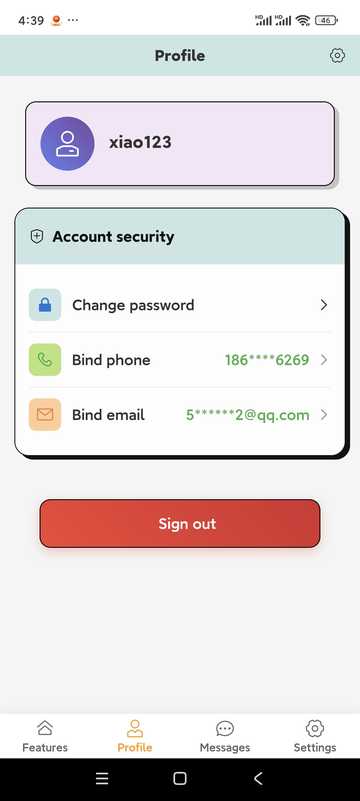
Überprüfen Sie den Status Ihres Kontos; tippen Sie auf die Option, um Ihr Kennwort zu ändern, Ihre Kontaktdaten zu aktualisieren oder sich von Ihrem Konto abzumelden (das Abmelden entfernt Bindungen und Aufzeichnungen, seien Sie vorsichtig).
Profil ändern
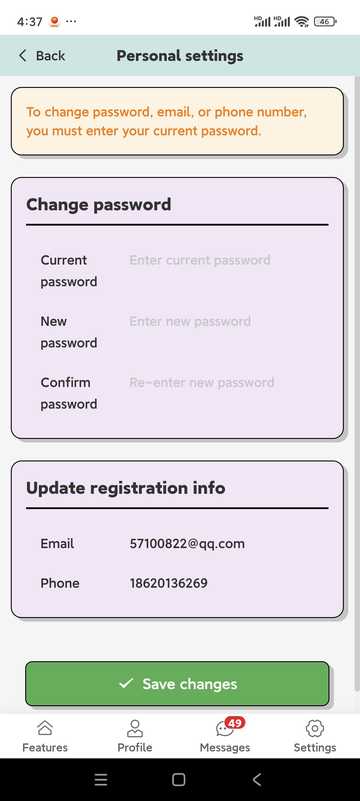
- Kennwörter bestehen im Allgemeinen aus mehr als 6 Buchstaben + Zahlen (abhängig von den App-Hinweisen)
- Benutzer in Festlandchina müssen sicherstellen, dass ihre Telefonnummer korrekt ist, um das Kennwort wiederherstellen zu können; Benutzer in anderen Ländern und Regionen müssen sicherstellen, dass ihre E-Mail-Adresse korrekt ist
Nachrichtenzentrum
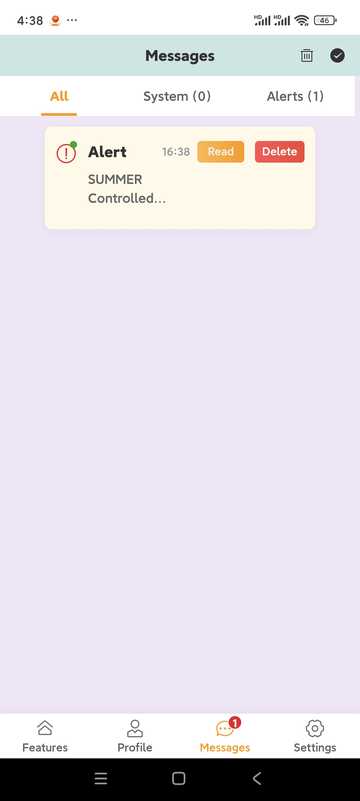
- Empfangen Sie Desktop-Kontrollereignis-Erinnerungen (wenn Screenshot-Push aktiviert ist usw.)
- Systemankündigungen und Mitteilungen
Andere Einstellungen
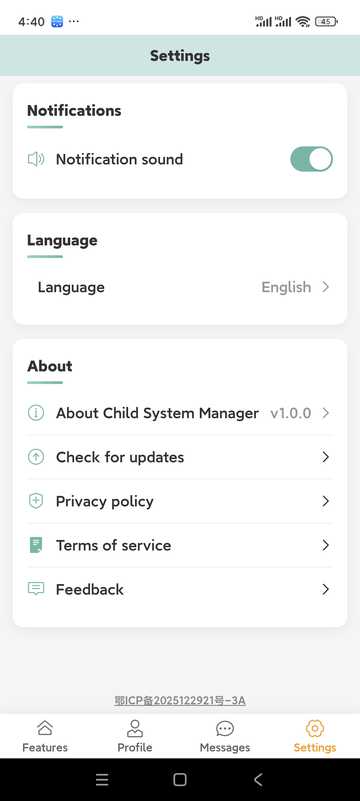
- Ob ein Ton abgespielt werden soll, wenn der Alarm ausgelöst wird
- Mehrsprachige Umschaltung
- Update
- Feedback-Portal
VIII. Tipps · Hinweise · App-FAQ
Tipps
- Überprüfen Sie regelmäßig die Nutzungsstatistiken und passen Sie die Regeln gemeinsam mit Ihrem Kind an
- Schlagen Sie Zeitlimits schrittweise vor und kommunizieren Sie diese im Voraus
- Entwickeln Sie eine Gewohnheit, das Nachrichtenzentrum zu überprüfen und Ausnahmen rechtzeitig zu behandeln
- Bitte verwenden Sie es in Übereinstimmung mit dem Gesetz und mit dem Wissen der betreuten Person
- Bewahren Sie Ihr Konto und Ihr Kennwort sicher auf
- Halten Sie App und Desktop auf neueren Versionen
App-FAQ
- Wie füge ich ein Gerät hinzu?
- Klicken Sie auf der Startseite auf "Gerät hinzufügen", folgen Sie dem Bindungscode, um die Kopplung auf der Computerseite abzuschließen; der Computer muss die Desktop-Seite installiert haben.
- Gerät ist offline
- Überprüfen Sie, ob das Computernetzwerk, die Stromversorgung und die PC-Seite ausgeführt werden; falls die Software durch Sicherheitssoftware blockiert wird, geben Sie sie in der Sicherheitssoftware frei.
- Kennwort vergessen?
- Verwenden Sie "Kennwort vergessen" auf der Anmeldeseite, um es über den Telefon- oder E-Mail-Vorgang zurückzusetzen.
- Mitgliedschaft vs. Testphase?
- Test- und Mitgliedschaftsregeln werden in der Software gekennzeichnet; einige Fernkonfigurationsfunktionen können nach Ablauf eingeschränkt sein, bitte folgen Sie den In-App-Hinweisen.
Fehlerbehebung
Häufige Fragen und Lösungen
Mögliche Ursachen:
- Betriebssystembeschädigung
- Antivirensoftware ist beschädigt. Diese Software wurde von 10 großen Antivirenprogrammen der Welt getestet, aber die Kompatibilität mit allen Antivirenprogrammen oder späteren Versionen ist nicht garantiert.
- Systemkompatibilitätsprobleme: Diese Software unterstützt Windows 10 64-Bit-Betriebssysteme, aber die Kompatibilität mit allen Windows 10 64-Bit-Betriebssystemen ist nicht garantiert.
Lösung:
- Fügen Sie die Software in der Antivirensoftware zur Whitelist hinzu oder aktualisieren Sie die Antivirensoftware auf die neueste Version
- Überprüfen Sie die Kompatibilität der Systemversion. Wenn die Systemversion nicht unterstützt wird, aktualisieren Sie das Betriebssystem auf die neueste Version
- Zögern Sie nicht, uns um Hilfe zu bitten!
Mögliche Ursachen:
- Netzwerkverbindungsprobleme
- Kontoinformationen sind falsch
- PC-App läuft nicht korrekt
Lösung:
- Netzwerkverbindung überprüfen
- Bestätigen Sie, dass die Kontoinformationen korrekt sind
- PC-App neu starten
Mögliche Ursachen:
- Spielprogrammname geändert
- Neues Spiel ist nicht in der Datenbank
- Einstellungen sind zu streng
Lösung:
- Spielprogramme manuell hinzufügen
- Software aktualisieren
- Erkennungseinstellungen anpassen
FAQ
Häufig gestellte Fragen
- Diese Anleitung anzeigen
- Hilfe-Center öffnen
- Senden Sie eine E-Mail an service@stellarorigin.com
- WeChat hinzufügen: stellarorigin
- QQ: 57100822