Kid's End: Installation and Uninstallation
This section corresponds to theOrdinateurs Windows utilisés quotidiennement par les enfantsClients on (unlike apps that parents have installed on their phones). Install the package from the Page officielle de téléchargement du site Web Fetched.
Ce logiciel prend pleinement en compte les lois et règlements de divers pays sur la protection des mineurs, ainsi que les préoccupations des parents concernant l'utilisation des ordinateurs par les enfants et les adolescents, de sorte qu'une variété de fonctions ont été conçues pour protéger la vie privée et la sécurité des mineurs. Se conformer aux dispositions de confidentialité de chaque pays et ne pas collecter, stocker ou utiliser les informations de confidentialité d'un mineur.
Operating environment (extracted from instructions)
| project | Configuration minimale | System Values |
|---|---|---|
| Système d'exploitation | Windows 10 64-bit | Windows 10 64-bit |
| Processor | Dual-core 2.0 GHz | Quad-core 2,5 GHz et plus |
| Memory | 4 GB | 8 GB or more |
| Disk space | 200 MB available | More than 1 GB (for easy screenshot storage) |
| Réseau | Internet requis | Haut débit stable |
Installation steps
- Obtained from the official website or installation media .zip Install the package. Extract the exe to execute the security package and double-click Run.
- Double-cliquez pour exécuter ; le programme d'installation prend en charge plusieurs langues et la langue de l'interface est automatiquement sélectionnée en fonction de la langue système Windows.
- Une fois l'installation terminée, le logiciel démarre automatiquement et l'interface principale ou l'icône du plateau apparaît.
- Configuration requise pour le premier démarrageAt least 6 digitsGérez les mots de passe et remplissez lePhone and email(Please be sure to be correct). Mainland China is generally retrieved by text message, and other regions are retrieved by email verification code.
- You will be prompted whether to bind the phone management terminal, you can bind or not. If you have downloaded the mobile phone management terminal, click the "+" number on the mobile phone to get the binding code, and enter it on the computer to complete the binding. If you haven't installed the parent terminal yet, you can also set up the local rules on this computer first, and once the parent terminal is installed and connected to the account, you can remotely adjust it on your own device.
- Please follow the prompts to complete the first run of version 1.0Test de la carte graphique(See "Graphics Card Detection and Live Streaming Monitoring" below), so that multi-dimensional monitoring and live broadcast scene recognition are more accurate. Since version 1.1, for ease of operation, the graphics card detection function has been integrated into the software, no separate operation is required.
Спосіб деінсталяції
- Il peut également être désinstallé via l'→application Paramètres Windows.
- Please click on the bottom left side of the software interface"Désinstallation du logiciel", press the wizard to complete the uninstallation.
Parent Mobile (brief)
Parents are invited to visitown mobile phoneInstall the Admin app on (different from the program on your child's computer). Scan the code or download the app store to register and log in; see the "Parent App Instructions" at the bottom of this page for details.
Device Binding and System Settings
Liaison et gestion des appareils
Generated by Parent Mobile App Code de liaison dynamique à 6 chiffres, établissez une relation de confiance après avoir saisi sur l'ordinateur de l'enfant. Une fois connectés, les parents peuvent afficher leur statut en ligne à distance, recevoir des notifications et prendre le contrôle. Lier jusqu'à par PCTwo mobile phones; The first account linked is the primary account, then added as a secondary account.
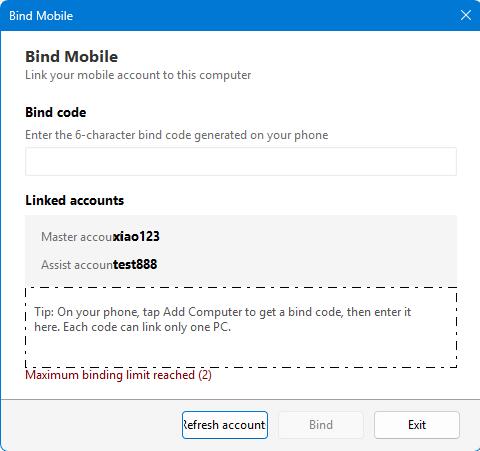
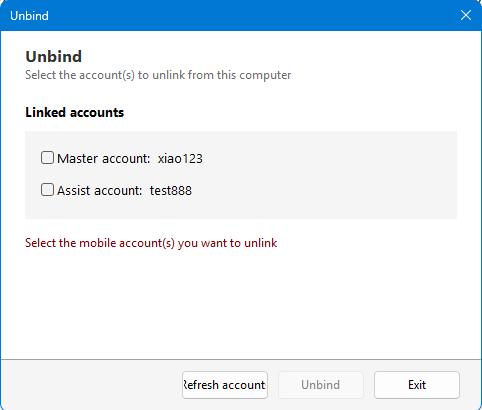
Utilisation
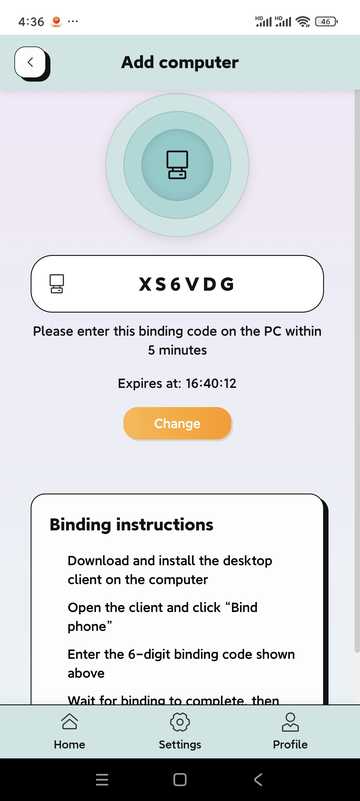
- Cliquez sur « Ajouter un ordinateur » dans l'application mobile du parent pour obtenir le code de liaison.
- Click "Bind phone" on the main screen of the child's computer.
- Entrez le code de liaison et cliquez sur Lier.
- Lorsque vous avez besoin de vous désolidariser, accédez à l'écran « Se désolidariser », entrez le mot de passe et cliquez sur « Se désolidariser ».
- Le code de liaison est limité dans le temps, veuillez effectuer l'opération pendant la période de validité.
- After unbinding, the computer is no longer controlled remotely by the mobile phone, butNative Saved Policiesrestera.
Configuration Système
Configure global monitoring policies in this set: keywords, OCR, multi-dimensional monitoring, actions performed in case of abnormalities, network/browser restrictions, timed screenshots, tray display, etc.
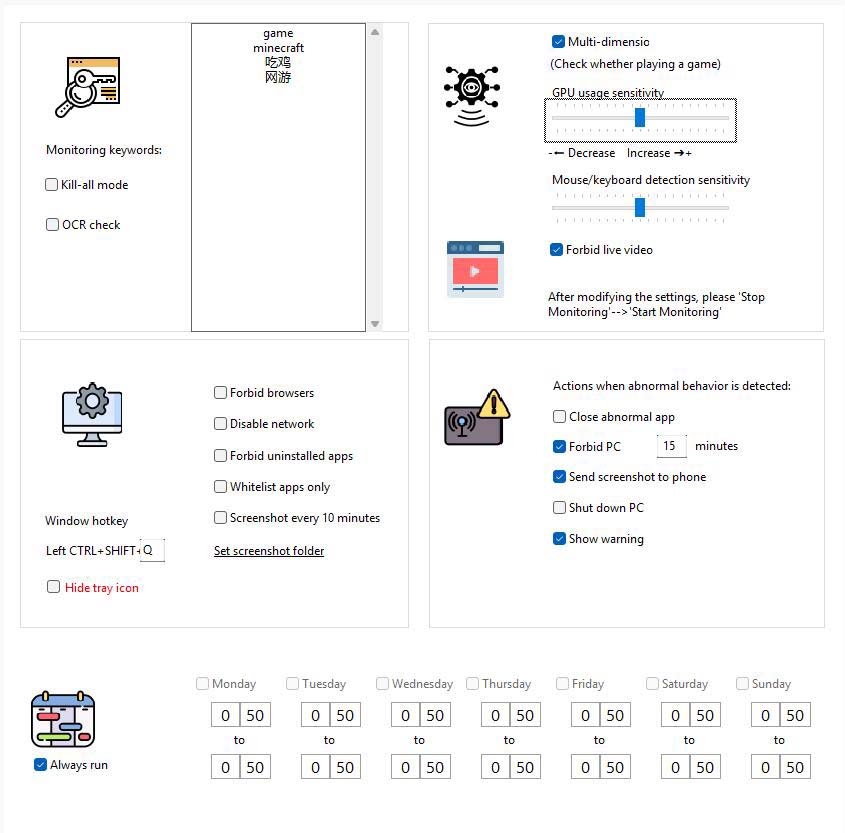
Key points of the interface (extracted from the instructions)
- Mots-clés de surveillance :Window title or screen text to be monitored (e.g. “Game”, Game English name, etc.).
- Kill Mode:Keyword detection for all windows (not exempt from whitelisting).
- Test OCR :Regularly identify the screen area text near the mouse and compare it to keywords.
- Surveillance multidimensionnelle :Combiné à l'utilisation de cartes graphiques et au comportement d'utilisation de l'utilisateur pour évaluer de manière exhaustive le comportement du jeu ; il est recommandé d'ajouter à la liste blanche les logiciels d'apprentissage/de bureau couramment utilisés pour éviter toute erreur de jugement.
- Sensibilité du clavier et de la souris :Modulate Behavioral Analysis Sensitivity.
- L'IA détecte si une vidéo en direct est regardée :Block live gaming apps. Note: This feature is overly complex to implement with low system occupancy and there is currently a possibility of miscalculation. In our tests, more than 95% of livestreams will be recognized as normal, but a very small part of normal operation may be recognized as livestreams. So please turn it on or off as needed.
- Action when an abnormality is found:Such as closing abnormal applications, disabling computers, sending screenshots to mobile phones, shutting down, etc.; you can check whether to display a warning. If you do not display a warning, if you find that abnormal behavior is captured, you will directly perform control actions. If an alert is displayed, the user is prompted and the control action is performed after the countdown has ended.
- Whitelist software only:Lorsque cette option est activée, seuls les programmes de la liste blanche sont autorisés à s'exécuter.
- Do not display tray icon/Disable network/Disable browser/Scheduled screenshots:Cochez la case en fonction des besoins réels de la famille ; le répertoire des captures d'écran peut être spécifié dans les paramètres.
Utilisation
- Allez dans Paramètres système.
- Remplissez les mots-clés au besoin, vérifiez les éléments de surveillance, définissez la sensibilité et les actions anormales.
- Click “Save Settings” to take effect; click “Stop Monitoring” temporarily.
Suggestions de la direction
Create a standard Windows user for your child
If your child already has a high level of computer talent and is approaching the entry level of a professional, he may be willing to try various ways to bypass your controls. You can create a standard Windows user for it, and you use the Windows admin account yourself. This gives you more control over your child's computer usage.
Planning, sites, listes et journaux
List Management (Whitelist)
The software in the whitelist will not be recognized as game software; it is suitable for adding common learning and office programs.
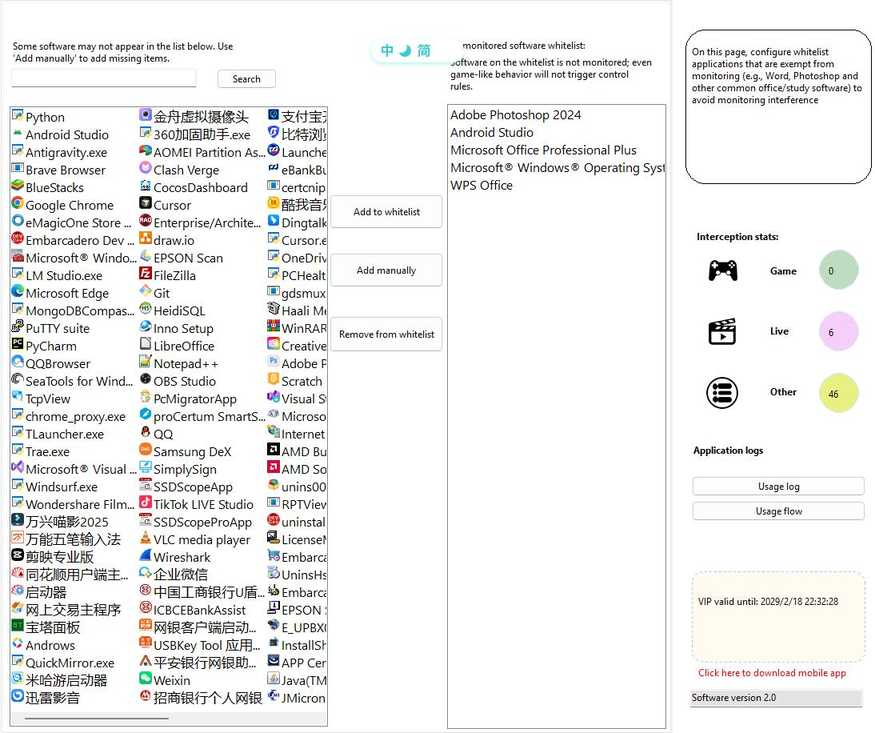
- Accédez à Gestion des listes.
- Lookup:The search box filter already has a whitelist.
- Add to:Select from the candidate list, or enter the software name manually, or select .exe from the Add Your Own.
- Delete:Supprimez ou double-cliquez sur supprimer après avoir sélectionné une entrée dans la liste de gauche.
- Your changes will take effect when you save or switch pages.
Computer usage schedule
ParamètresEntire computerHeures disponibles ; les heures non disponibles peuvent verrouiller l'interface et empêcher toute utilisation ultérieure.
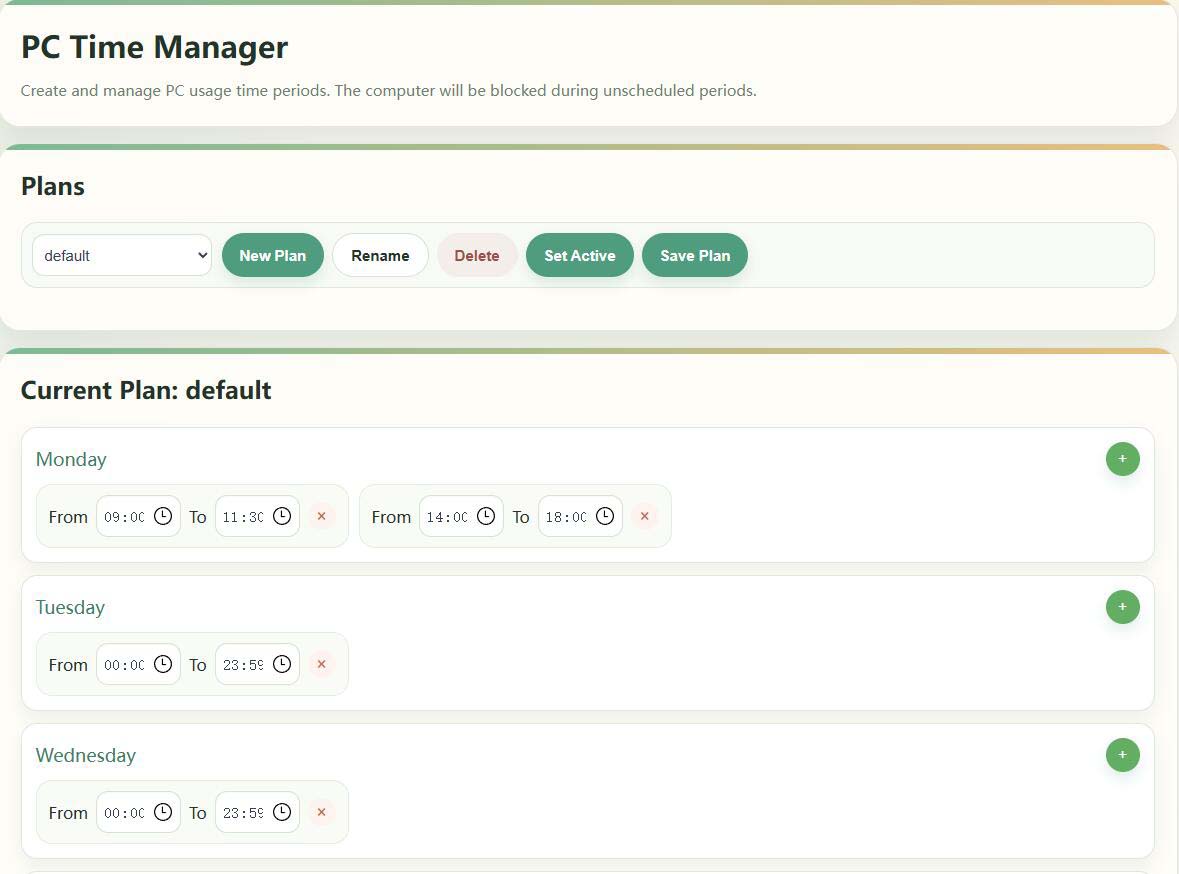
- Go to Computer Usage Schedule.
- Create/Rename/Delete a Schedule in the Schedule Schedule and set it asActivation(Affichage actif).
- Set multiple hours of availability by week on the right, effective after saving.
If it is temporarily released, "stop monitoring" can be used on the desktop or mobile phone; if the lock screen time is not reached but the screen is not locked, please check the current activation plan and the system time (see the manual FAQ).
Calendrier d'utilisation du logiciel
forSpecify SoftwareSet a separate window for when you can run (for example, allow gaming clients only for certain hours on weekends).
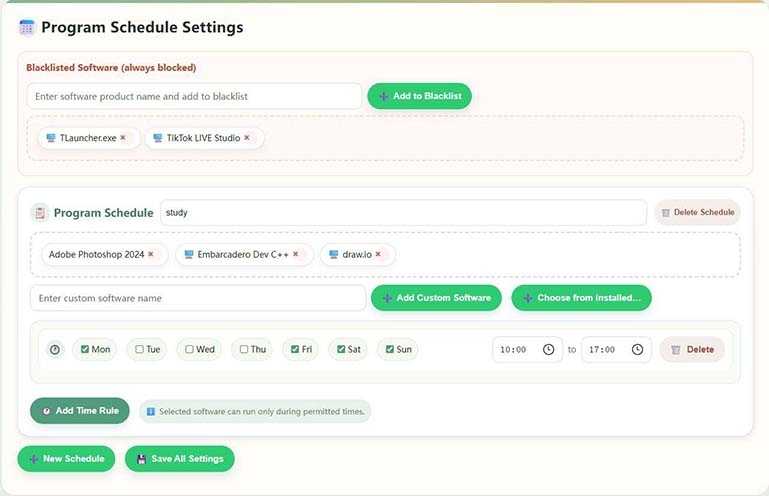
- Accédez au calendrier d'utilisation du logiciel.
- Check the programs you want to control in Installed Software (you can select more than one).
- L'ajout de semaines et d'heures de début et de fin aux paramètres du calendrier du programme vous permet de définir plusieurs règles pour le même logiciel.
- Si la liste n'a pas de programme cible, vous pouvez soit « Saisir un nom de logiciel personnalisé », soit l'ajouter à l'aide de la description du nom du produit .exe.
- Click “Save Settings” when you're done. Whitelisted software is exempt from this restriction.
Domain Management (Website Access Control)
Gérer les sites Web accessibles : bibliothèques catégorisées intégrées pour les jeux/vidéos, prise en charge de l'interdiction totale ou de la pressetime rulesLimited access.
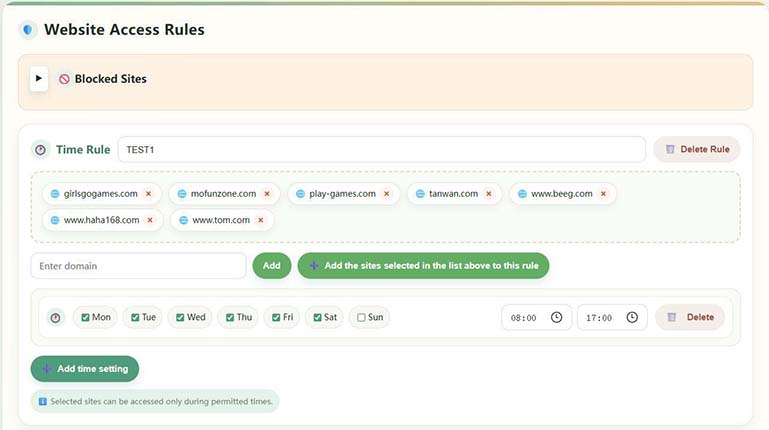
- Go to Domain Management.
- Browse the built-in categories and custom websites on the left, and filter the positioning with keywords.
- When there is no preset domain name, use "Add a custom website".
- Save after configuring Full Ban or Time Rule; sites within the rule can only be opened during licensed hours.
Sites de jeux courants intégrés pour une configuration rapide ; remplissez le nom de domaine complet lors de la personnalisation.
Graphics card detection and live broadcast monitoring
Used to establish a GPU-occupied baseline and improve the recognition accuracy of games/live broadcasts with high loads;After installing or replacing the graphics card for the first timeIl est recommandé de le mettre en œuvre une fois.

- Go to Graphics Testing.
- Remplissez le champ « Entrez le nom du site en direct » pour remplir les stations en direct couramment utilisées (telles que les dents de tigre, etc.).
- En cliquant sur « Démarrer la configuration », le système calibrera le GPU ; n'exécutez pas d'autres programmes graphiques à occupation élevée pendant le processus.
- Approximately 2-3 minutes to complete and prompt for success.
Application logging and screenshot viewing
Affichez la durée d'utilisation de chaque logiciel, le nombre de démarrages, l'organigramme des axes temporels et (s'il est activé) les captures d'écran automatiques pour faciliter l'examen post-mortem.
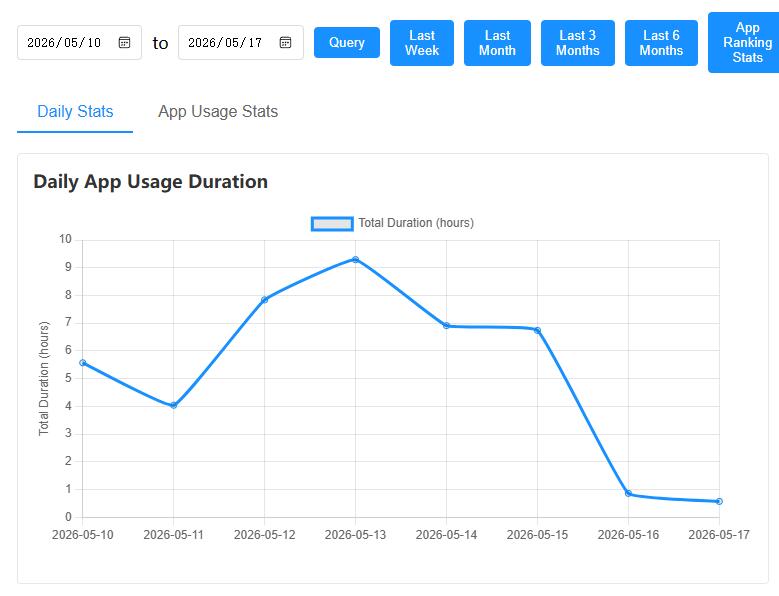
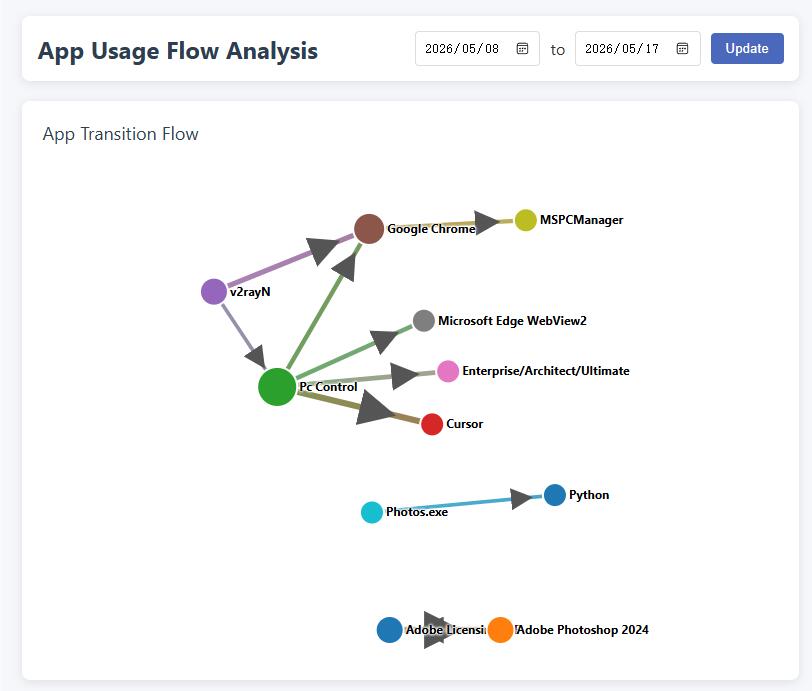
- Software Usage Record:View statistics in Application→ History Software Usage History.
- Using Flowcharts:Afficher les bascules et les associations d'applications par chronologie.
- Parcourir les captures d'écran :Automatic screenshots need to be turned on in the system settings; the directory is customizable and it is recommended to clean it regularly to save disk.
Account Security & Membership (Desktop)
- MODIFIER LE MOT DE PASSEAccédez à « Modifier le mot de passe » ; l'oubli affectera les opérations sensibles telles que la suppression de la liaison.
- Affiliate infoThe VIP expiration date can be viewed in the "Registration Information" area of the main screen, and some advanced capabilities may be limited after the expiration.
- Téléchargement sur téléphone :Cliquez sur « Cliquez ici pour télécharger l'application mobile » pour obtenir l'application parent.
- RemoveSee “Device Binding” above.
Instructions de l'application parente
Les mappages suivants sont installés dansParents own mobile phoneLe côté gestion du est utilisé conjointement avec le côté PC de l'ordinateur de l'enfant ; des règles complexes peuvent également être configurées dans l'interface de gestion locale de l'ordinateur.
Le texte s
A. Software Overview
This app helps parents remotely understand and manage their children's computer usage on their mobile phones: view screenshots, set time periods, control websites and keywords, receive alerts, etc. The PC side needs to be installed on the computer used by the child and be able to connect to the Internet.
Privacy NoteLes données du PC et de cette application sont principalement stockées sur votre propre appareil, et le système ne transfère pas votre contenu personnel sur le serveur de l'opérateur. L'idée d'une communication peer-to-peer entre le téléphone mobile et l'ordinateur est plus sécurisée.
Key Features
- Device Binding and Management: Adding and Managing Bound Computers
- Real-time viewing: See computer screenshots for usage
- Time control: usage duration, schedule and time management
- Content Control: Website and App Rules, Keywords and Behavioral Monitoring Linkage
- Centre de messagerie : Recevez des événements de contrôle et des messages système
- Statistical report: Usage duration and application usage overview, and timely intervention for control
- Temporary control: shutdown, timing, remote locking, screenshots, etc.
II. Quick Start
2.1 User Registration
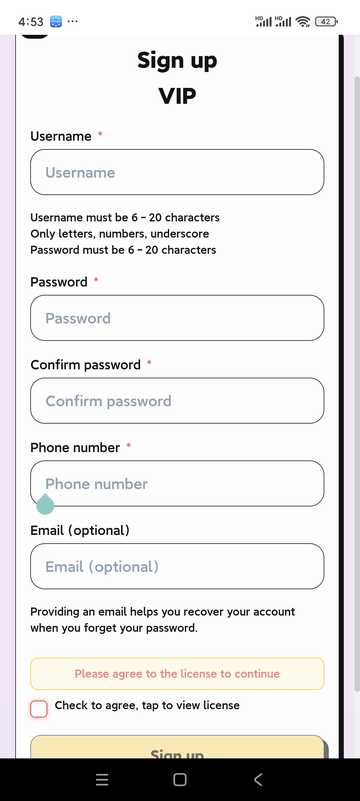
- Open the app and click "Register"
- Remplissez le nom d'utilisateur, le mot de passe et d'autres informations
- Read and agree to the User Agreement and Privacy Policy
- Cliquez sur S'inscrire pour terminer la création de votre compte
- Users in mainland China must ensure that their phone number is correct in order to retrieve their password; users in other countries can leave their phone number blank, but they must ensure that their email address is correct! This email address will then be used to retrieve the password.
2.2 User Login
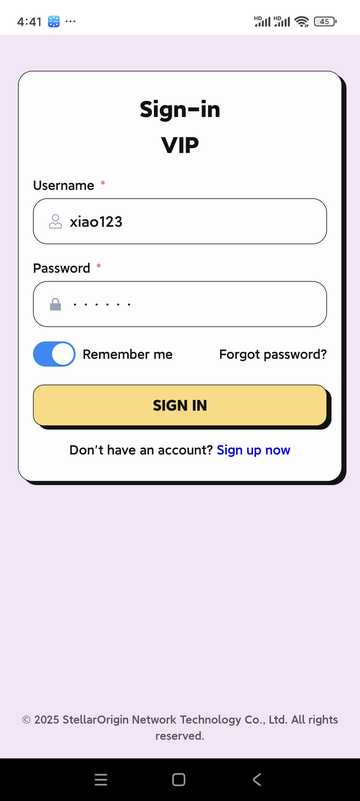
- Saisissez le nom d'utilisateur et le mot de passe
- Option "Remember password" for next login
- Click "Log in" to enter the app
III. Page d'accueil et gestion de l'équipement
3.1 Accueil
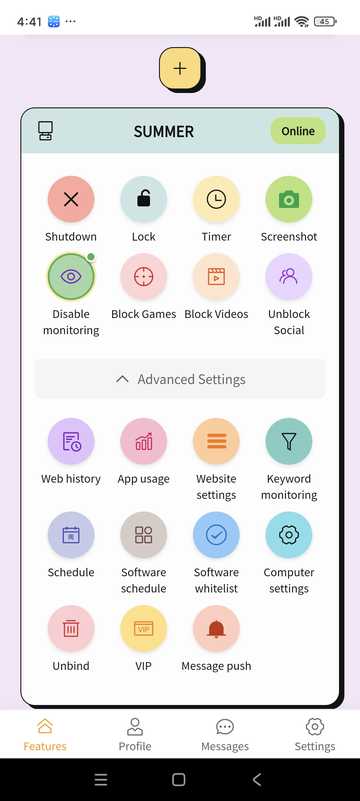
- Manage or add bound devices
- Afficher le statut en ligne de l'appareil
- Accédez rapidement aux fonctionnalités communes (arrêt, verrouillage, capture d'écran, planification, etc.) via le panneau de fonctions
3.2 Ajout d'appareils
- Sur la page d'accueil, cliquez sur « Ajouter un appareil » ou « + »
- The system generates a 6-digit binding code (example: 5R5W2V)
- Sur l'ordinateur de votre enfant, installez et ouvrez le bureau et cliquez sur « Lier le téléphone »
- Entrez le code de liaison ci-dessus sur le côté de l'ordinateur
- Wait for the link to succeed to manage the PC on your phone
3.3 Computer settings (some options)
Les restrictions de réseau/navigateur, la roc, la surveillance du comportement et la disposition post-déclenchement peuvent être configurées pour les ordinateurs liés (conformément aux politiques côté PC).
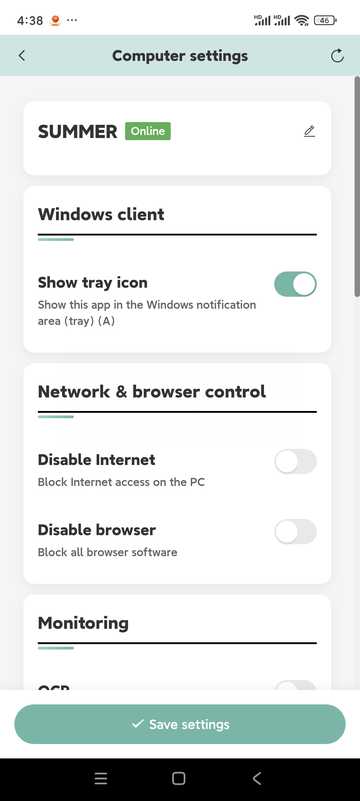
- No Internet/No Browser
- OCR recognition (in conjunction with keyword control; about every 5 seconds)
- Behavioral monitoring (integrated keyboard and mouse, graphics card, etc. to judge game behavior)
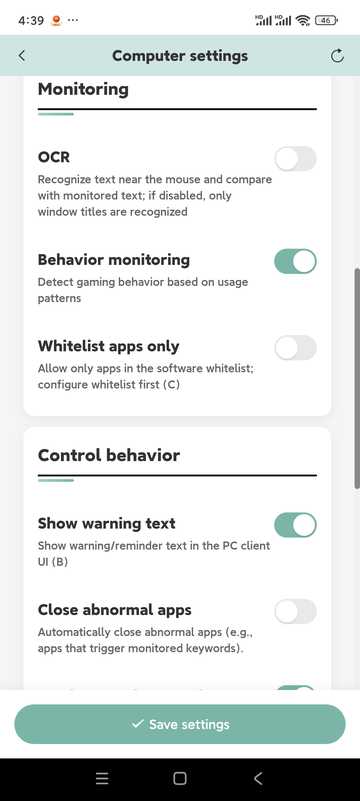
- Close abnormal apps, send screenshots to phone
- Désactiver l'ordinateur, éteindre l'ordinateur
- Eye protection mode (timeout lock mandatory rest)
- "Points mode" is reserved, the current version is not enabled
IV. Timing · Remote Locking · Screenshots
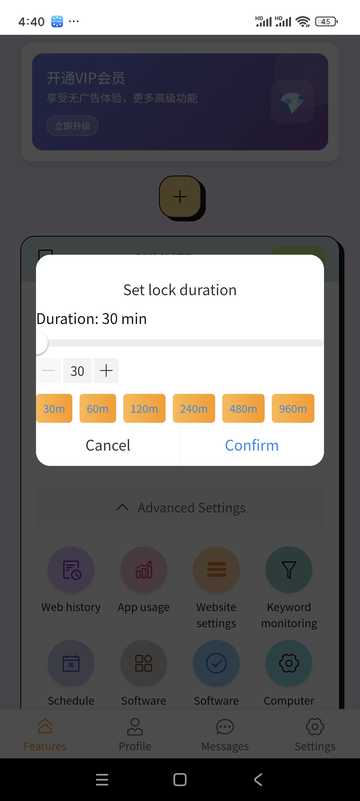
Utilisation programmée
- Périphérique...
- Set allowable usage duration
- When turned on, it will be locked or handled by policy
Verrouillage à distance
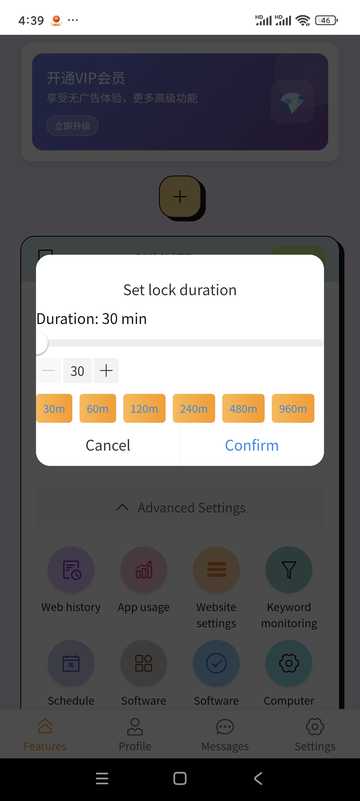
- Lockable on time
- Unlock remotely in the app when needed
Captures d'écran d'ordinateur
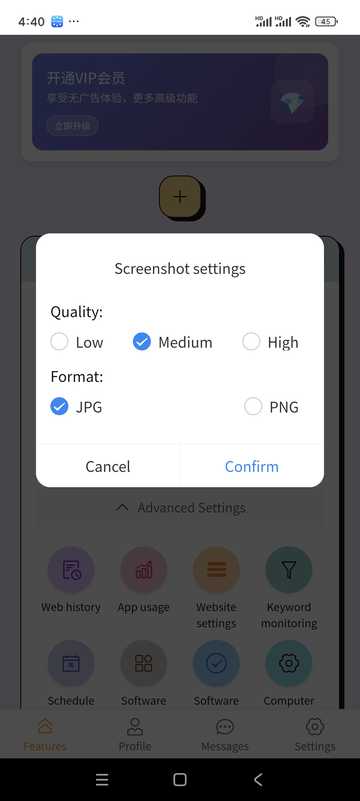
- Appuyez sur Capture d'écran.
- View current screen
- Peut être enregistré sur votre téléphone
V. Schedule · Application Record · Keywords · Website
computer schedule
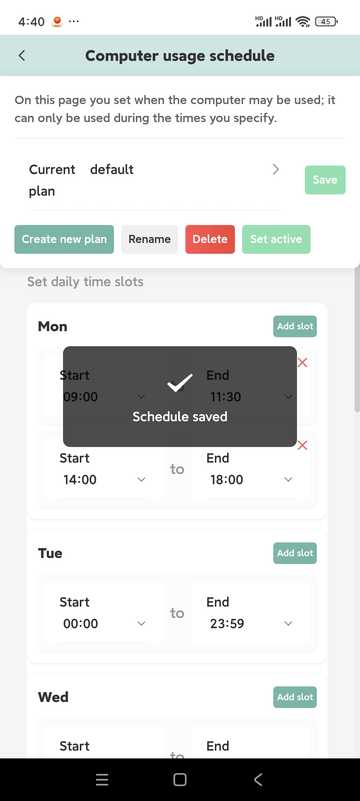
- Set daily available hours beyond which it can be automatically locked
- Multiple time slots can be configured on the same day
- Séparable par semaine
- Plusieurs plans peuvent être construits et l'un d'entre eux peut être activé au besoin
Appliquer l'enregistrement
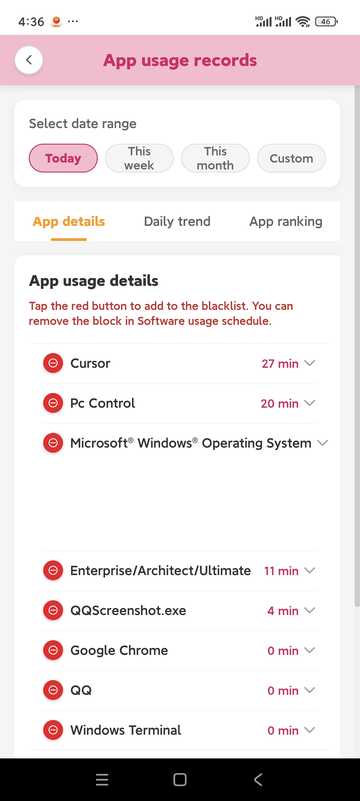
- Voyez combien de temps et à quelle fréquence l'application est utilisée
- Can be combined with record retightening strategy
Surveillance des mots-clés
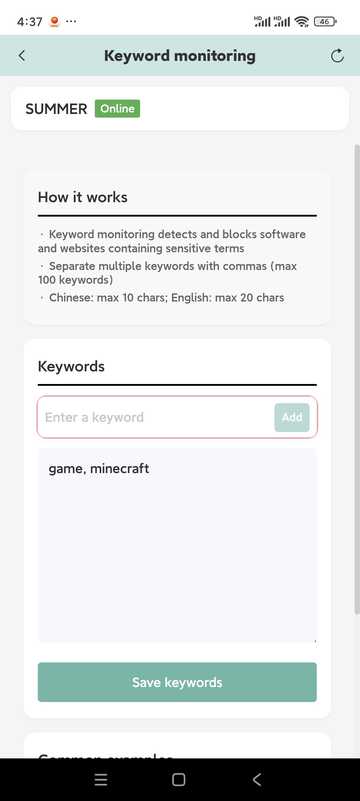
- Add keywords to monitor
- The maximum length is about 10 words in Chinese and about 20 characters in English (subject to the prompts in the software)
- Keywords need to appear inTitre de la fenêtreIl est facile de déclencher au milieu ; pour reconnaître le texte de l'écran, veuillez coopérer avec l'OCR dans les paramètres de l'ordinateur
- Identify locally and reduce the risk of privacy breaches
Website settings
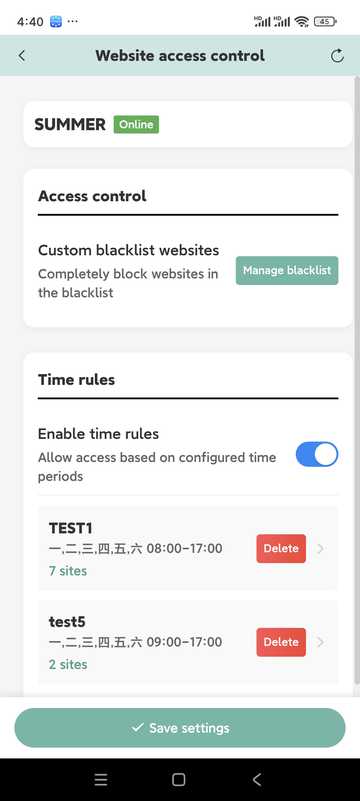
- Tenir à jour les listes noires et les heures d'accès
- Peut inclure des sites similaires dans la même règle de temps
- If the control is abnormal, check whether the PC is blocked by the security software and release it.
VI. Informations VIP
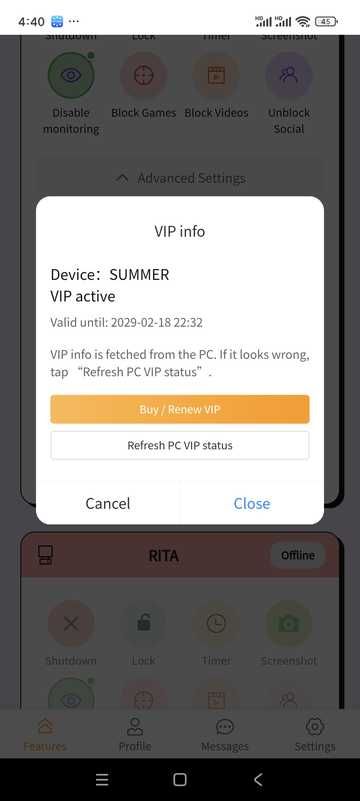
- See your current tiers and when they expire
- Select the appropriate amount of time on the package page and complete the payment (based on the in-software payment method)
La description du prix se trouve également dans la section « Description du prix » sur la page d'accueil de ce site.
VII. Personal Center · Messages · Settings
personal information
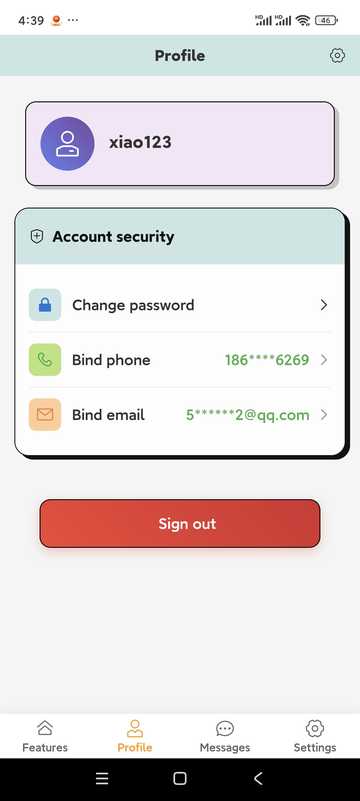
Check the status of your account; tap the option to change your password, update your contact details, or log out of your account (logging out will remove bindings and records, be careful).
Change Profile
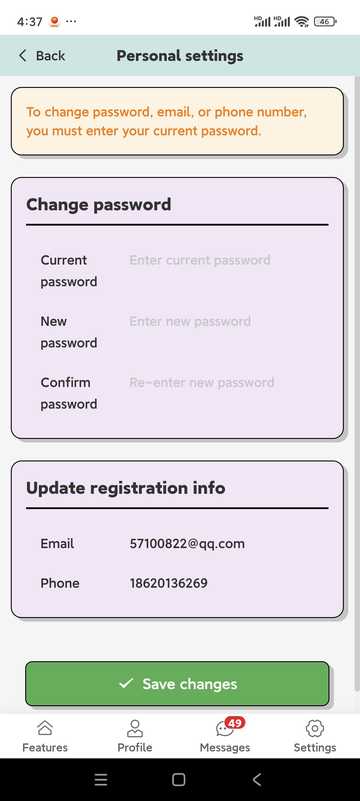
- Passwords are generally more than 6 letters + numbers (subject to app prompts)
- Users in mainland China must ensure that their phone number is correct in order to retrieve the password; users in other countries and regions must ensure that their email address is correct
Message center
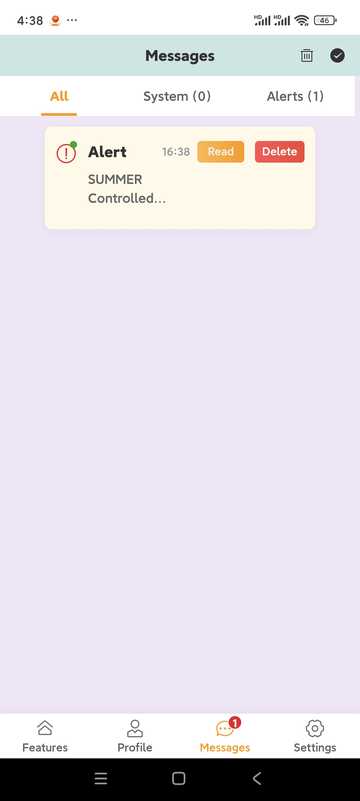
- Receive desktop control event reminders (if screenshot push is turned on, etc.)
- Annonces et notifications système
Other Settings
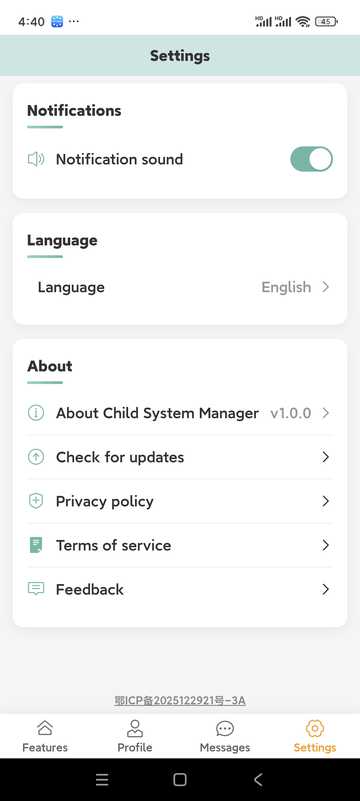
- Whether to play a tone when the alarm arrives
- Commutation multilingue
- Update
- Feedback portal
VIII. Tips · Precautions · app Frequently Asked Questions
Tips
- Regularly review usage statistics and adjust rules with your child
- Time Limit Suggestions Step-by-Step and Communicate in Advance
- Développer l'habitude de consulter le centre de messagerie et de gérer les exceptions en temps opportun
- Veuillez utiliser conformément à la loi et à la connaissance du service
- Keep your account password safe
- Conserver l'application et le bureau comme versions plus récentes
FAQ de l'application
- How do I add a device?
- On the home page, "Add device", press the binding code to complete the pairing on the computer side; the computer needs to have the desktop side installed.
- Device is offline
- Check whether the computer network, power supply and PC side are running; if you are killed by soft interception, release it in kill soft.
- Lost Password?
- Utilisez « Mot de passe oublié » sur la page de connexion pour réinitialiser par numéro de téléphone ou par flux d'e-mails.
- Membership vs. Trial?
- Trial and membership rules will be marked in the software; some remote setting capabilities may be limited after expiration, please follow the in-app prompts.
Dépannage
Questions courantes et solutions
Causes possibles :
- Dommages au système d'exploitation
- Anti-virus software is damaged. This software has been tested by 10 major anti-virus software in the world, but all anti-virus software or subsequent versions are not guaranteed to be compatible.
- System compatibility issues This software supports Windows 10 64-bit operating systems, but does not guarantee that all Windows 10 64-bit operating systems will be compatible.
Solution :
- Add a whitelist to your antivirus, or update your antivirus to the latest version
- Check the system version compatibility, if the system version is not supported, please upgrade the operating system to the latest version
- Don't hesitate to contact us for help!
Causes possibles :
- Problèmes de connectivité réseau
- Account info is incorrect
- L’application PC ne fonctionne pas correctement
Solution :
- Vérifier la connexion réseau
- Confirmez que les informations du compte sont correctes
- Redémarrer l’application PC
Causes possibles :
- Game program name changed
- New game is not in the database
- Settings are too strict
Solution :
- Manually add game programs
- Mettre à jour le logiciel
- Ajuster les paramètres de détection
FAQ
FAQ
- Voir ce guide
- Accéder au centre d’aide
- Send mails to service@stellarorigin.com
- Add WeChat: stellarorigin
- QQ:57100822