Kid version: installation and uninstallation
This section corresponds to installation inWindows computers that kids use every dayPelanggan pada (tidak seperti aplikasi yang telah dipasang oleh ibu bapa pada telefon mereka). Pasang bungkusan dari 官网Download page Get.
本软件充分考虑了各国关于保护未成年人的法律法规,以及家长对儿童、青少年使用电脑的担忧,因此设计了多种Features来保护未成年人的隐私andSecurity。遵守各国隐私条款,不收集、不存储、不使用任何未成年人的隐私信息。
运行环境(摘自说明书)
| project | 最低配置 | Konfigurasi yang Disyorkan |
|---|---|---|
| 操作系统 | Windows 10 64-bit | Windows 10 64-bit |
| Pemproses | Dual core 2.0 GHz | Quad-core 2.5 GHz dan ke atas |
| Memory | 4 GB | 8GB or higher |
| Disk space | 200 MB tersedia | 1 GB 以上(便于截屏存储) |
| 网络 | 需联网 | Stable broadband |
安装步骤
- Get it from the official website or installation media .zip Pasang pakej. Ekstrak exe untuk melaksanakan pakej keselamatan dan klik dua kali Run.
- Klik dua kali untuk menjalankan; pemasang menyokong berbilang bahasa dan secara automatik akan memilih bahasa antara muka mengikut bahasa sistem Windows.
- Selepas pemasangan selesai, perisian akan bermula secara automatik, dan ikon antara muka atau dulang utama akan muncul.
- Persediaan diperlukan untuk permulaan pertamaAt least 6 people的管理密码,并填写用于找回密码的Telefon dan e-mel(Sila pastikan anda betul). Tanah Besar China biasanya diambil melalui mesej teks, dan rantau lain diambil melalui kod pengesahan e-mel.
- Sistem akan menggesa anda sama ada untuk mengikat terminal pengurusan telefon mudah alih. Anda boleh mengikatnya atau tidak. Jika anda telah memuat turun terminal pengurusan mudah alih, klik tanda "+" pada terminal mudah alih untuk mendapatkan kod pengikatan dan masukkannya pada komputer untuk melengkapkan pengikatan. Jika anda belum memasang klien induk lagi, anda boleh menetapkan peraturan setempat pada komputer ini dahulu; selepas klien induk dipasang dan dikaitkan dengan akaun anda, anda boleh melaraskannya dari jauh pada peranti anda sendiri.
- Please follow the prompts to complete the first run of version 1.0.显卡检测(Lihat "Pengesanan Kad Grafik dan Pemantauan Penstriman Langsung" di bawah), supaya pemantauan pelbagai dimensi dan pengiktirafan adegan siaran langsung lebih tepat. Oleh kerana versi 1.1, untuk memudahkan operasi, fungsi pengesanan kad grafik telah disepadukan ke dalam perisian, tiada operasi berasingan diperlukan.
卸载方法
- 也可通Lengkapkan penyahpasangan melalui Windows "Tetapan → Aplikasi".
- 请在软件界面底部左侧点击"Pembatalan Pemasangan Perisian", tekan wizard untuk melengkapkan penyahpasangan.
Parent mobile app (brief)
家长请在own mobile phone上安装管理端 APP(与孩子电脑上的程序不同)。扫码或Apps商店Download后注册、Sign in即可;详细图文见本页下方「家长 APP 使用说明」。
设备绑定与系统set up
设备绑定与管理
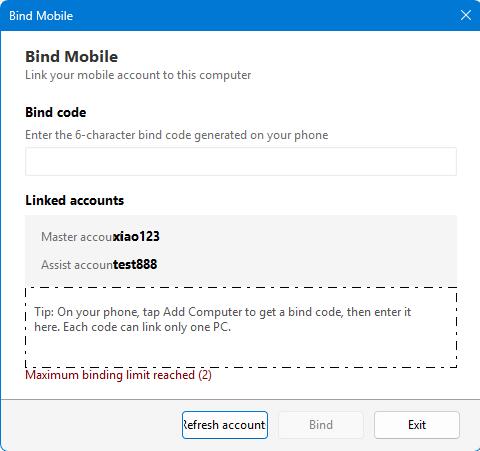
Dijana oleh Aplikasi Mudah Alih Induk Kod pengikatan dinamik 6 digit, wujudkan hubungan amanah selepas memasukkan pada komputer kanak-kanak. Selepas mengikat, ibu bapa boleh menyemak status dalam talian dari jauh, menerima pemberitahuan dan melakukan kawalan. Bilangan maksimum pengikatan setiap komputerDua telefon bimbit; Akaun pertama yang dipautkan adalah akaun utama, kemudian ditambah sebagai akaun kedua.
操作步骤
- Klik "Tambah Komputer" dalam APP mudah alih induk untuk mendapatkan kod mengikat.
- Klik "Ikat telefon" pada skrin utama komputer kanak-kanak.
- Masukkan kod mengikat dan klik Ikat.
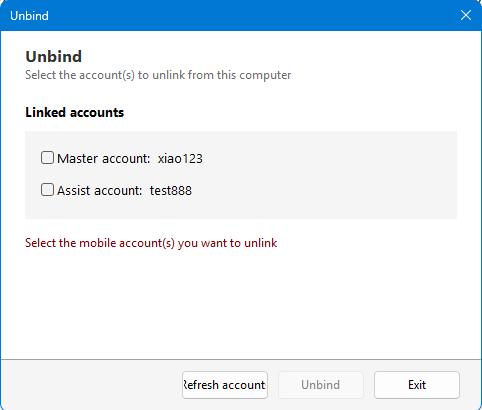
- Apabila anda perlu membuka ikatan, masukkan skrin "Nyahikat", masukkan kata laluan dan klik "Nyahikat".
- 绑定码有时效,请在有效期内完成操作。
- 解绑后电脑不再受手机端远程控制,但Locally saved policiesakan kekal.
系统set up
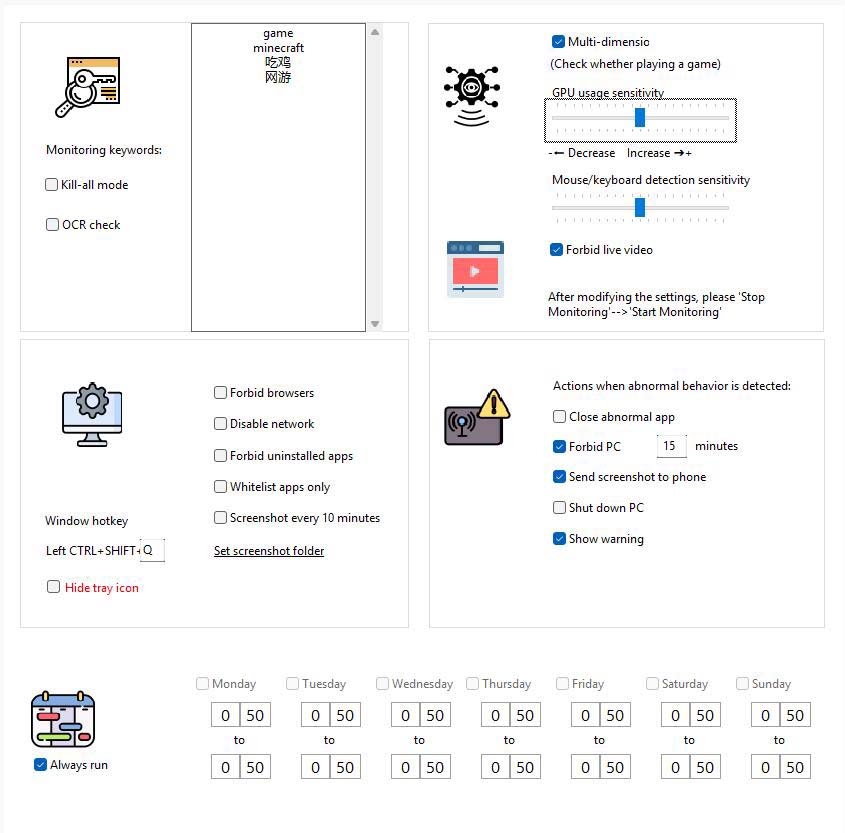
Configure global monitoring strategies in this center: keywords, OCR, multi-dimensional monitoring, actions performed when exceptions occur, network/browser restrictions, scheduled screenshots, tray display, etc.
界面要点(摘自说明书)
- Monitor keywords:需监控的窗口标题或屏幕文字(如「游戏」、游戏英文名等)。
- Kill mode:对所有窗口做关键字检测(不受白名单豁免)。
- Ujian OCR:Regularly identify text in the screen area near the mouse and compare it with keywords.
- 多维监控:结合显卡使用及用户操作行for等综合判断游戏行for;建议常用学习/办公软件加入白名单以免误判。
- Kepekaan papan kekunci dan tetikus:Memodulasi Sensitiviti Analisis Tingkah Laku.
- AI检测是no观看直播视频:拦截游戏直播类Apps。Note:此Features在低系统占用率的情况下实现过于复杂,当前存在误判可能。在我们的测试中,95%以上的直播会被正常识别,但极小部分正常操作可能会被识别for直播。所以请依据需要是no开启此Features。
- Tindakan apabila ketidaknormalan ditemui:Seperti menutup aplikasi tidak normal, melumpuhkan komputer, menghantar tangkapan skrin ke telefon bimbit, mematikan, dll.; anda boleh menyemak sama ada untuk memaparkan amaran. Jika anda tidak memaparkan amaran, jika anda mendapati bahawa tingkah laku tidak normal ditangkap, anda akan terus melakukan tindakan kawalan. Jika amaran dipaparkan, pengguna akan digesa dan tindakan kawalan dilakukan selepas pengiraan undur berakhir.
- Perisian senarai putih sahaja:开启后仅允许白名单内程序运行。
- 不显示托盘图标 / 禁用网络 / 禁用浏览器 / 定时截屏:Tandakan kotak mengikut keperluan sebenar keluarga; direktori tangkapan skrin boleh ditentukan dalam tetapan.
操作步骤
- Masukkan "Tetapan Sistem".
- Isikan kata kunci mengikut keperluan, semak item pemantauan, tetapkan sensitiviti dan tindakan tidak normal.
- Klik “Simpan Tetapan” untuk melaksanakannya; klik “Hentikan Pemantauan” buat sementara waktu.
management advice
Cipta pengguna Windows standard untuk anak anda
Jika anak anda sudah mempunyai tahap bakat komputer yang tinggi dan menghampiri tahap kemasukan profesional, dia mungkin bersedia untuk mencuba pelbagai cara untuk memintas kawalan anda. Anda boleh mencipta pengguna Windows standard untuknya, dan anda sendiri menggunakan akaun pentadbir Windows. Ini memberikan anda lebih kawalan ke atas penggunaan komputer anak anda.
Agenda, Website, List and Records
名单管理(白名单)
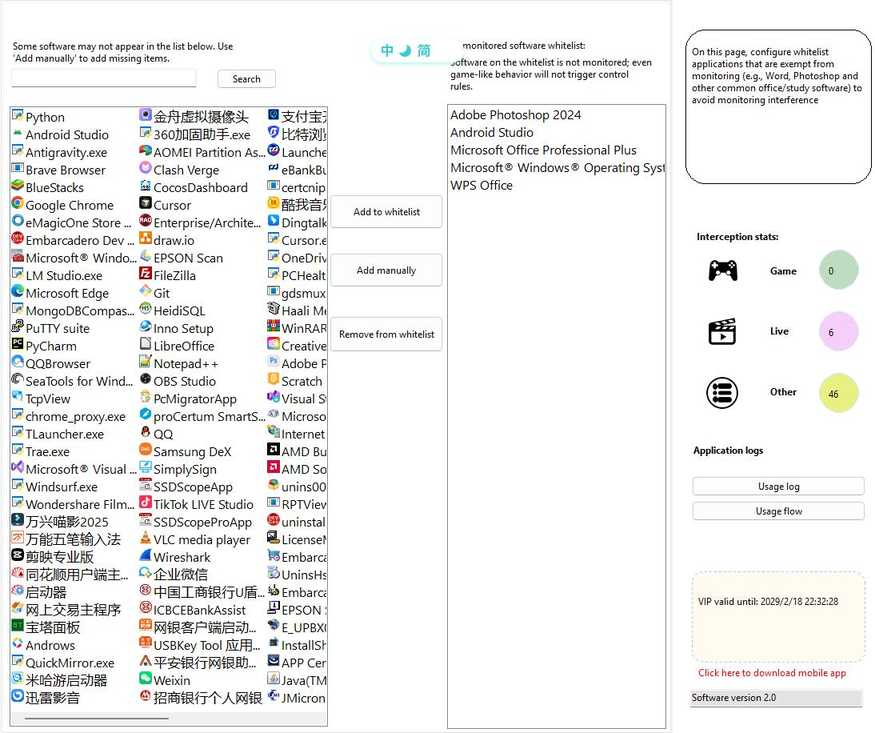
Software in the whitelist will not be recognized as game software; it is suitable for adding commonly used learning and office programs.
- 进入「名单管理」。
- 查找:搜索框筛选已有白名单。
- Add to:Pilih daripada senarai calon, atau masukkan nama perisian secara manual, atau pilih .exe daripada Tambah Sendiri.
- 删除:Select the entry in the left list and delete it or double-click to delete it.
- Modifications will take effect after saving or switching pages.
Computer usage schedule
set up整台电脑可用时段;非可用时段可锁定界面,阻止继续使用。
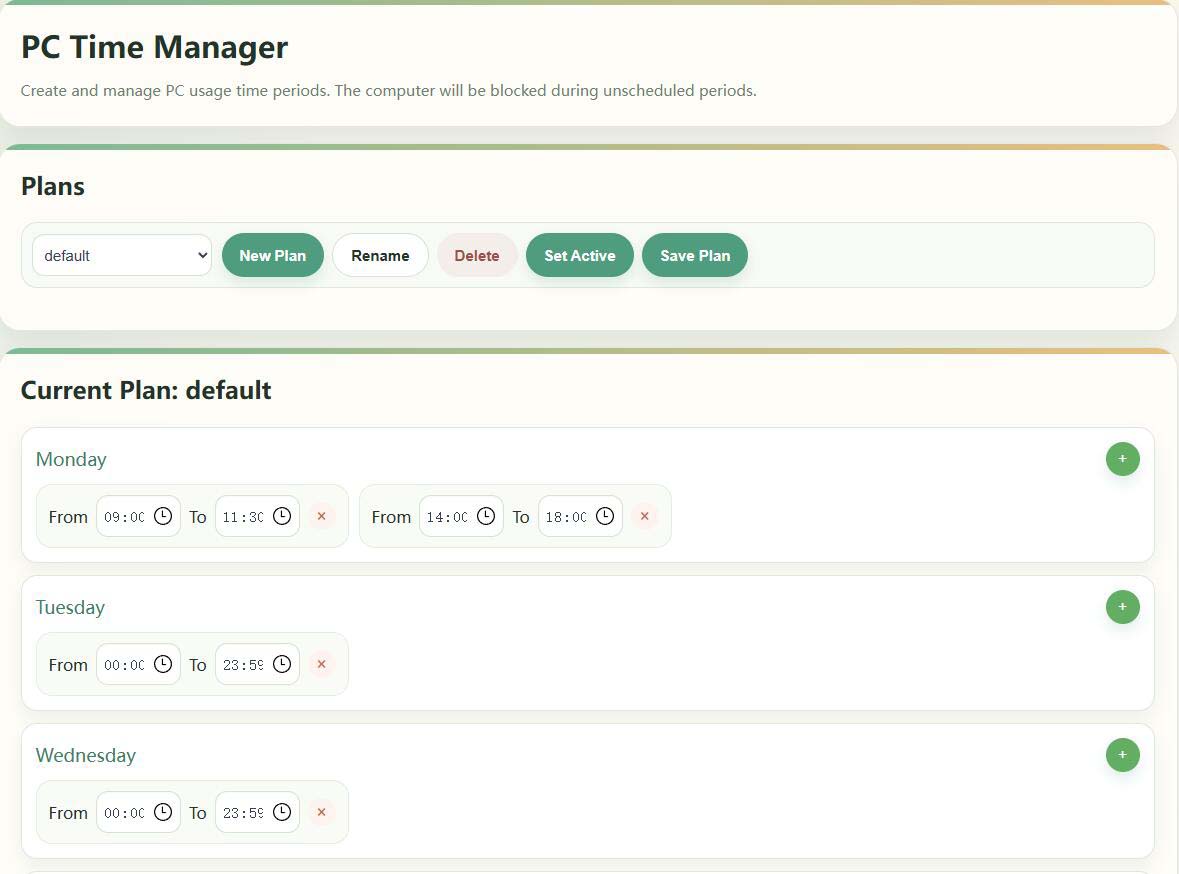
- 进入「Computer usage schedule」。
- 在「日程计划」中创建/重命名/删除计划,并将其一设for激活(显示「激活中」)。
- Set multiple available times by week on the right, which will take effect after saving.
If it is temporarily released, "stop monitoring" can be used on the desktop or mobile phone; if the lock screen time is not reached but the screen is not locked, please check the current activation plan and the system time (see the manual FAQ).
软件使用日程
fordesignated softwareTetapkan tetingkap berasingan untuk masa yang anda boleh jalankan (contohnya, benarkan pelanggan permainan hanya untuk jam tertentu pada hujung minggu).
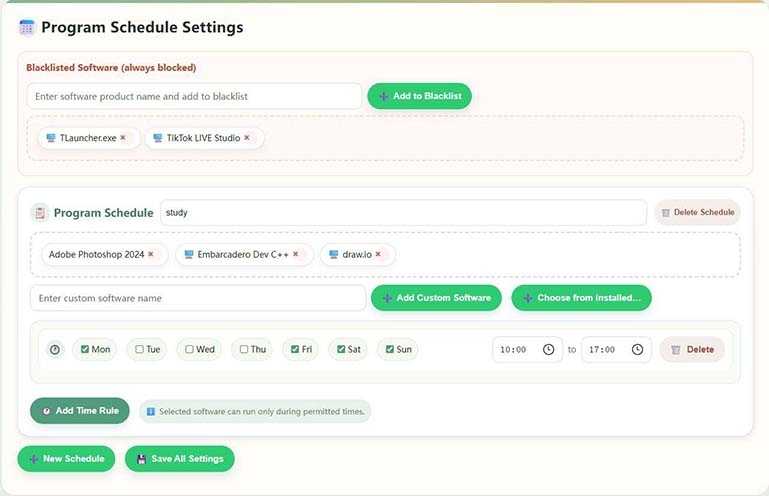
- Pergi ke Jadual Penggunaan Perisian.
- Semak program yang anda ingin kawal dalam Perisian Dipasang (anda boleh memilih lebih daripada satu).
- Menambah minggu dan masa mula dan tamat kepada Tetapan Kalendar Program membolehkan anda menetapkan berbilang peraturan untuk perisian yang sama.
- Jika senarai tidak mempunyai program sasaran, anda boleh sama ada "Masukkan nama perisian tersuai" atau menambahnya menggunakan perihalan .exe/nama produk.
- Klik “Simpan Tetapan” apabila anda selesai. Perisian senarai putih dikecualikan daripada sekatan ini.
Pengurusan Domain (Kawalan Akses Laman Web)
Manage accessible websites: Built-in game/video and other categories library, support complete ban or presstime rulesAkses terhad.
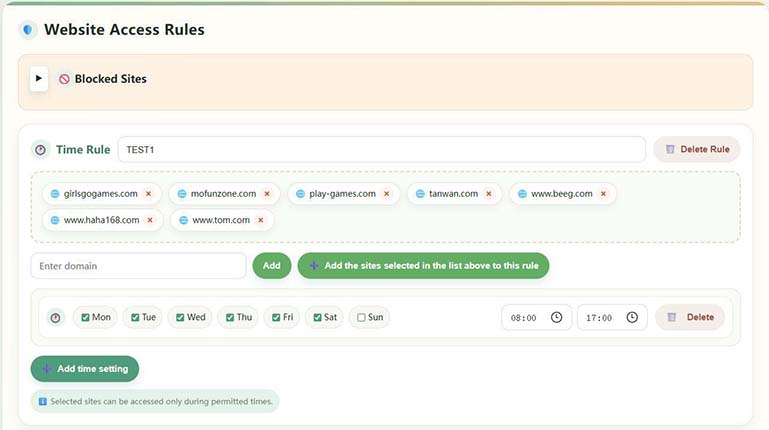
- 进入「域名管理」。
- Browse built-in categories and customized websites on the left, and you can filter and locate them by keywords.
- Jika tiada nama domain pratetap, gunakan "Tambah tapak web tersuai".
- Simpan selepas mengkonfigurasi Larangan Penuh atau Peraturan Masa; tapak dalam peraturan hanya boleh dibuka semasa waktu berlesen.
Built-in common game sites are easy to configure quickly; please fill in the complete domain name when customizing.
Graphics card detection and live broadcast monitoring
Digunakan untuk mewujudkan garis dasar yang diduduki GPU dan meningkatkan ketepatan pengiktirafan permainan/siaran langsung dengan beban tinggi;After installing or replacing a graphics card for the first timeAdalah disyorkan untuk melaksanakannya sekali.

- 进入「显卡检测」。
- 在「输入直播网站名称」中填写常用直播站(如虎牙等)。
- 点击「开始set up」,系统将校准 GPU;过程中请勿运行其它高占用显卡程序。
- 约 2~3 分钟完成并提示成功。
Pembalakan aplikasi dan paparan tangkapan skrin
Lihat tempoh penggunaan setiap perisian, bilangan permulaan, carta aliran paksi masa, dan (jika dihidupkan) tangkapan skrin automatik untuk memudahkan semakan postmortem.
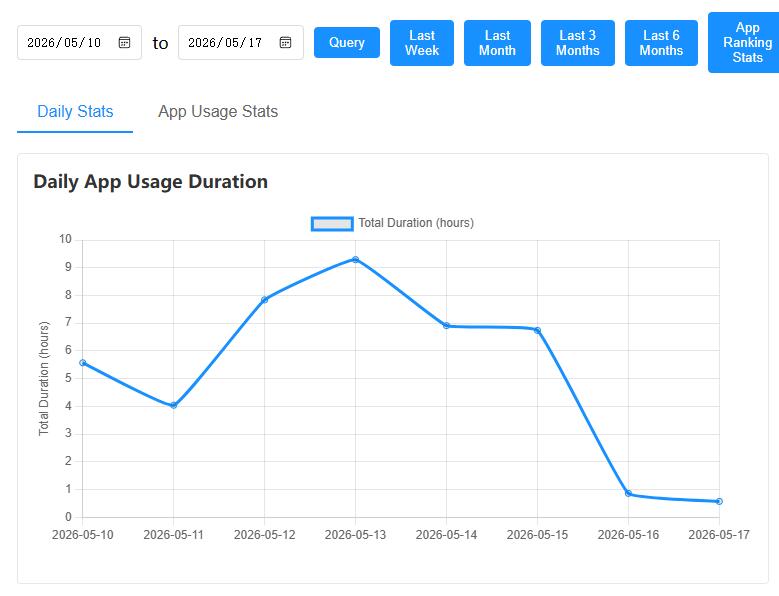
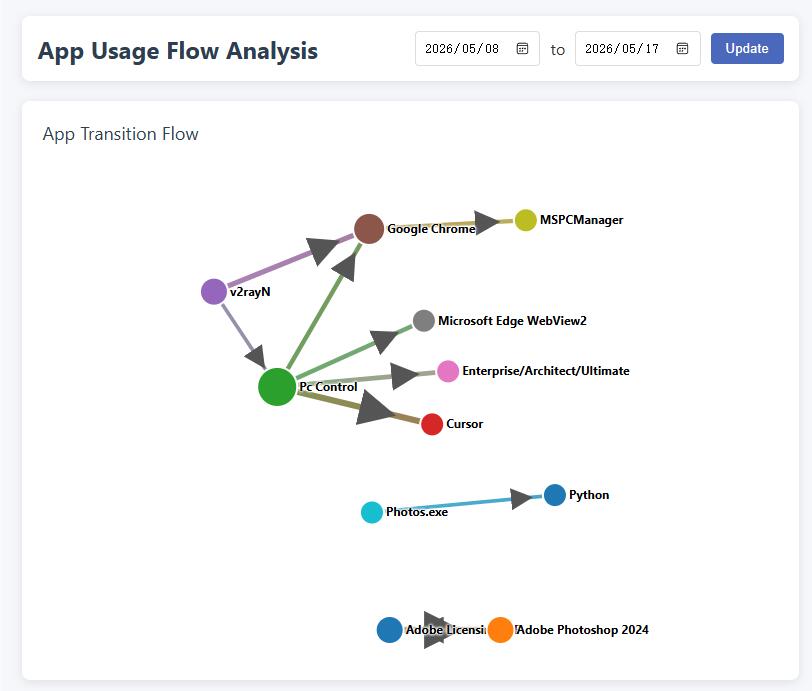
- Software usage records:Lihat statistik dalam→ Sejarah Aplikasi Sejarah Penggunaan Perisian.
- Use flow graph:View app switching and associations by timeline.
- Browse screenshots:Tangkapan skrin automatik perlu dihidupkan dalam tetapan sistem; direktori boleh disesuaikan dan disyorkan untuk membersihkannya dengan kerap untuk menyimpan cakera.
账户Security与会员(电脑端)
- 修改密码:Pergi ke "Tukar Kata Laluan"; melupakan akan menjejaskan operasi sensitif seperti tidak mengikat.
- Member information:Tarikh tamat tempoh VIP boleh dilihat di bahagian "Maklumat Pendaftaran" pada skrin utama, dan beberapa keupayaan lanjutan mungkin terhad selepas tamat tempoh.
- Download手机端:Klik "Klik di sini untuk memuat turun versi mudah alih" untuk mendapatkan APP induk.
- Nyahikat:Lihat "Pengikatan Peranti" di atas.
家长 APP 使用说明
Pemetaan berikut dipasang diTelefon bimbit ibu bapa sendiri上的管理端,与孩子电脑上的 PC 端配合使用;复杂规则也可在电脑本地管理界面配置。
Arahan Teks merujuk kepada "Arahan Penggunaan Aplikasi Anti Sihir Anak Biri-biri" dalam dokumen hak cipta; antara muka tertakluk kepada versi sebenar.
I. Pengenalan kepada Perisian
Aplikasi ini membantu ibu bapa dari jauh memahami dan menguruskan penggunaan komputer anak-anak mereka pada telefon bimbit mereka: melihat tangkapan skrin, menetapkan tempoh masa, mengawal laman web dan kata kunci, menerima amaran, dll. Bahagian PC perlu dipasang pada komputer yang digunakan oleh kanak-kanak dan boleh disambungkan ke Internet.
隐私说明:PC 端与本 APP的数据主要保存在your own设备中,系统不向运营方服务器传输您的个人隐私内容;手机与电脑之间for点对点通信思路,更安心。
Ciri-ciri Utama
- 设备绑定与管理:添加、管理已绑定的电脑
- Live View: View computer screenshots to see usage
- Time control: usage time, schedule and time period management
- Kawalan Kandungan: Peraturan Laman Web dan Aplikasi, Kata Kunci dan Pautan Pemantauan Tingkah Laku
- Message Center: Receive control events and system messages
- 统计报告:使用时长与Apps使用概况,并及时介入进行管控
- Temporary control: shutdown, timed use, remote locking, screenshots, etc.
二、快速开始
2.1 Pendaftaran Pengguna
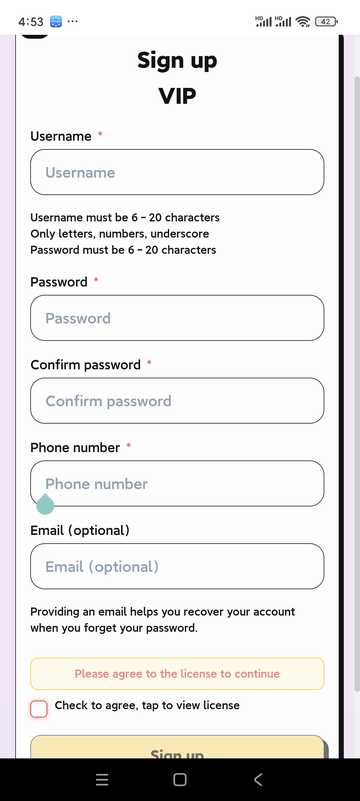
- Buka APP dan klik "Daftar"
- Isikan nama pengguna, kata laluan dan maklumat lain
- Baca dan bersetuju dengan Perjanjian Pengguna dan Dasar Privasi
- 点击「注册」完成账户创建
- Pengguna di tanah besar China mesti memastikan bahawa nombor telefon mereka betul untuk mendapatkan semula kata laluan mereka; pengguna di negara lain boleh membiarkan nombor telefon mereka kosong, tetapi mereka mesti memastikan bahawa alamat e-mel mereka betul! Alamat e-mel ini kemudiannya akan digunakan untuk mendapatkan semula kata laluan.
2.2 Log Masuk Pengguna
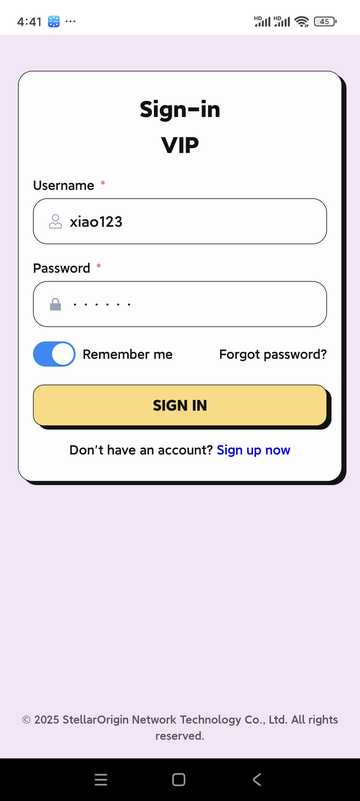
- 输入用户名与密码
- Pilihan "Ingat kata laluan" untuk log masuk seterusnya
- Klik "Log masuk" untuk memasuki aplikasi
III. Laman Utama dan Pengurusan Peralatan
3.1 Laman Utama
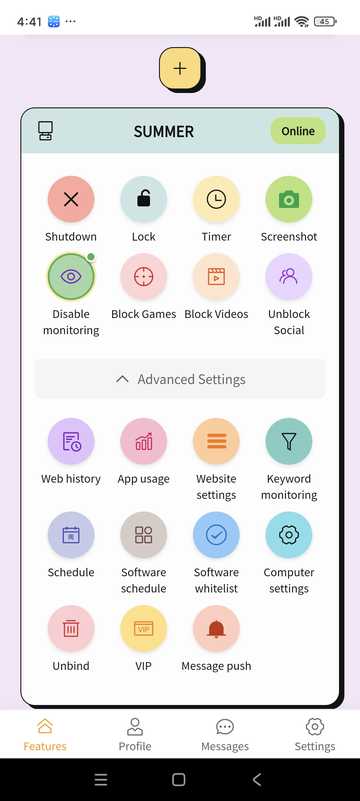
- Urus atau tambah peranti terikat
- Check device online status
- 通过「Features面板」快捷进入常用能力(关机、锁定、截屏、日程等)
3.2 Menambah Peranti
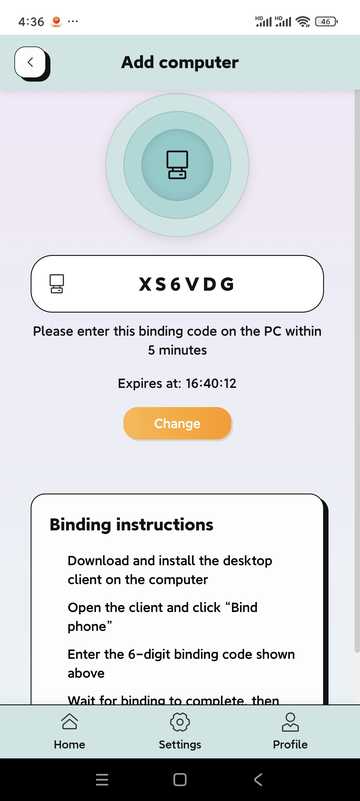
- 在Home点击「添加设备」或「+」
- The system generates a 6-digit binding code (example: 5R5W2V)
- Pasang dan buka klien PC pada komputer anak anda, klik "Bind Phone"
- Enter the above binding code on the computer
- Tunggu pautan berjaya untuk menguruskan PC pada telefon anda
3.3 Computer settings (some options)
For bound computers, network/browser restrictions, OCR, behavior monitoring, and handling methods after triggering can be configured (consistent with PC-side policies).
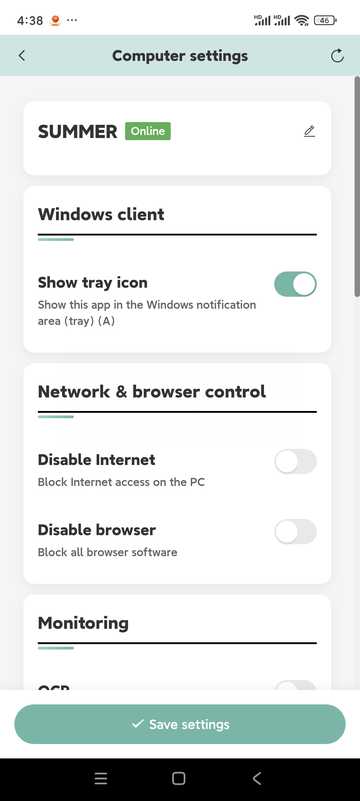
- Tiada Internet/Tiada Pelayar
- OCR 识别(与关键字管控配合;约每 5 秒识别一次)
- Pemantauan tingkah laku (papan kekunci dan tetikus bersepadu, kad grafik, dll. untuk menilai tingkah laku permainan)
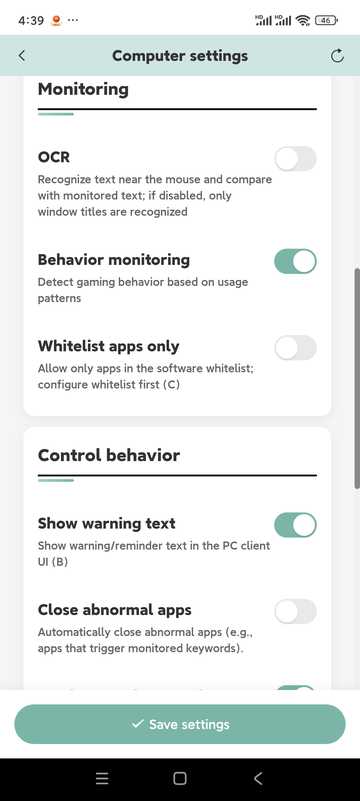
- Tutup aplikasi tidak normal, hantar tangkapan skrin ke telefon
- Lumpuhkan komputer, matikan komputer
- Mod perlindungan mata (rehat wajib kunci had masa)
- "Mod Mata" ialah item yang dikhaskan dan tidak didayakan dalam versi semasa.
4. Timing·Remote lock·Screenshot
计时使用
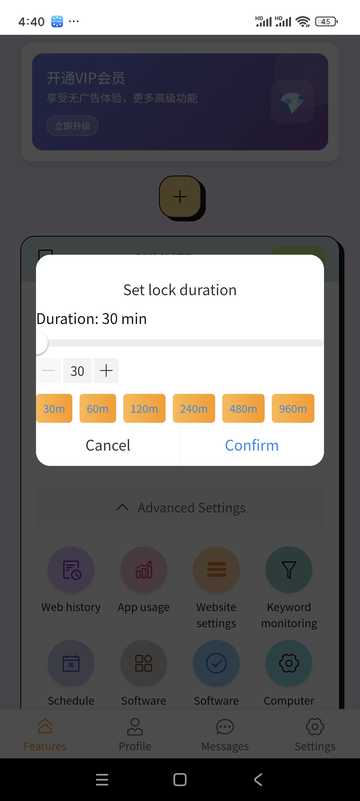
- Select device
- Tetapkan tempoh penggunaan yang dibenarkan
- Apabila dihidupkan, ia akan dikunci atau dikendalikan oleh polisi
远程锁定
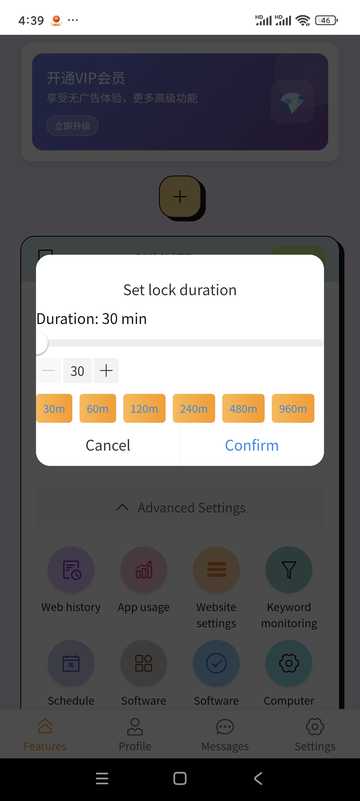
- Boleh dikunci tepat pada masanya
- Unlock remotely in APP when needed
Tangkapan skrin komputer
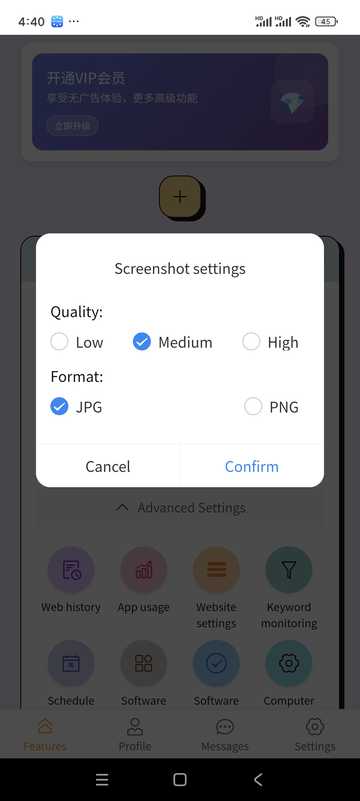
- 点「截屏」
- 查看当前画面
- Can be saved to mobile phone
五、日程 · Apps记录 · 关键字 · 网站
computer schedule
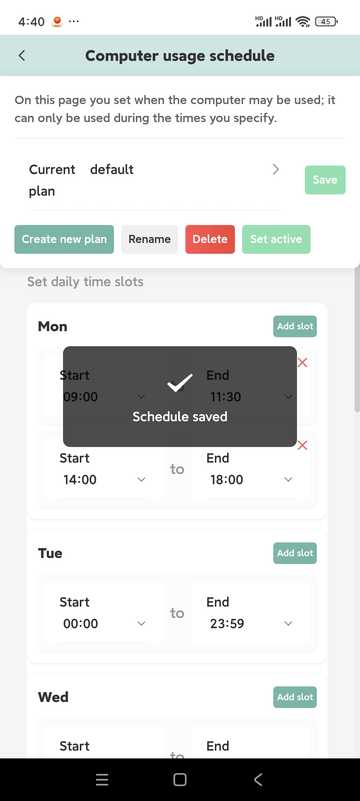
- Tetapkan waktu tersedia harian yang mana ia boleh dikunci secara automatik
- 同一天可配置多段时段
- Boleh dipisahkan mengikut minggu
- You can create multiple plans and activate one of them as needed
Apps记录
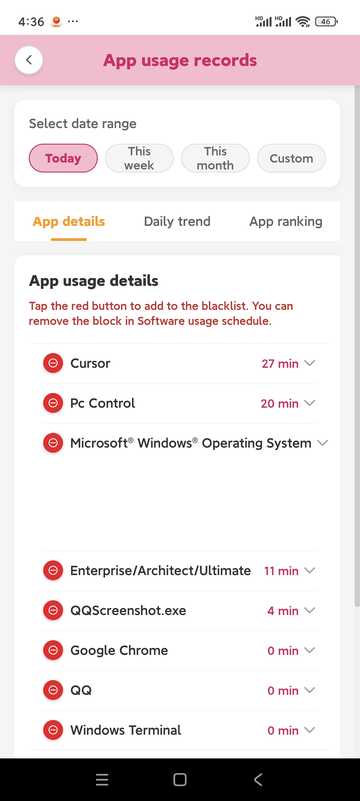
- Lihat berapa lama dan berapa kerap aplikasi digunakan
- Can be combined with recording and tightening strategies
关键字监控
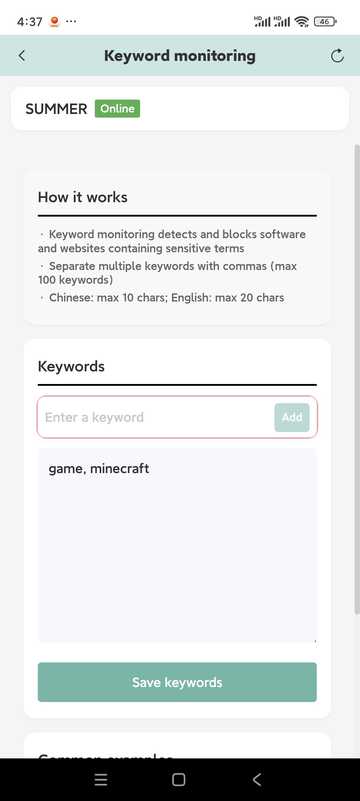
- Add keywords to be monitored
- Panjang maksimum adalah kira-kira 10 perkataan dalam bahasa Cina dan kira-kira 20 aksara dalam bahasa Inggeris (tertakluk kepada gesaan dalam perisian)
- 关键词需出现在窗口标题Ia mudah dicetuskan di tengah-tengah; untuk mengenali teks skrin, sila bekerjasama dengan OCR dalam tetapan komputer
- Kenal pasti secara tempatan dan kurangkan risiko pelanggaran privasi
Website settings
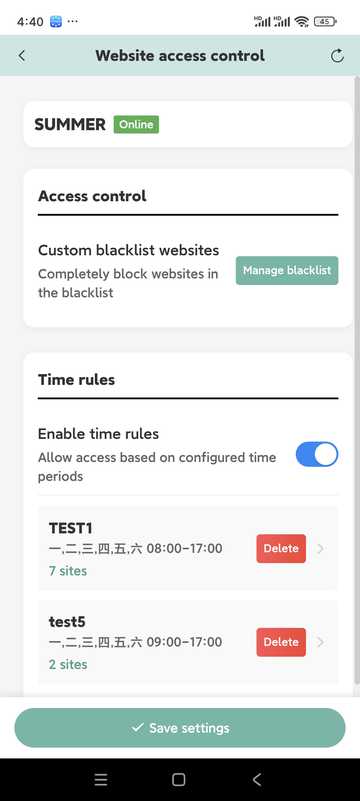
- Maintain blacklists and accessible periods
- Boleh memasukkan tapak yang serupa dalam peraturan masa yang sama
- Jika kawalan tidak normal, periksa sama ada PC disekat oleh perisian keselamatan dan lepaskan.
VI. Maklumat VIP
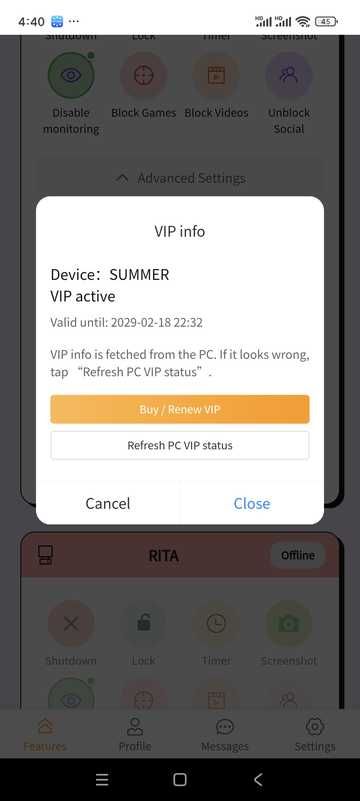
- Lihat peringkat semasa anda dan bila ia tamat tempoh
- Select the appropriate duration on the package page and complete the payment (subject to the payment method within the software)
Penerangan harga juga boleh didapati di bahagian "Perihalan Harga" di halaman utama tapak ini.
7. Personal Center · Message · Settings
personal information
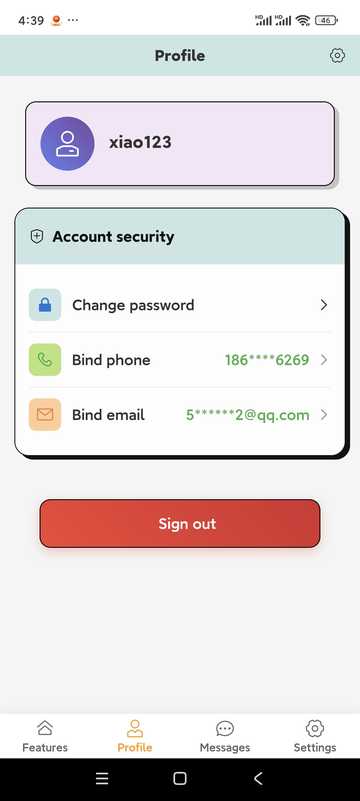
Semak status akaun anda; ketik pilihan untuk menukar kata laluan anda, mengemas kini butiran hubungan anda, atau log keluar daripada akaun anda (log keluar akan membuang ikatan dan rekod, berhati-hati).
修改个人资料
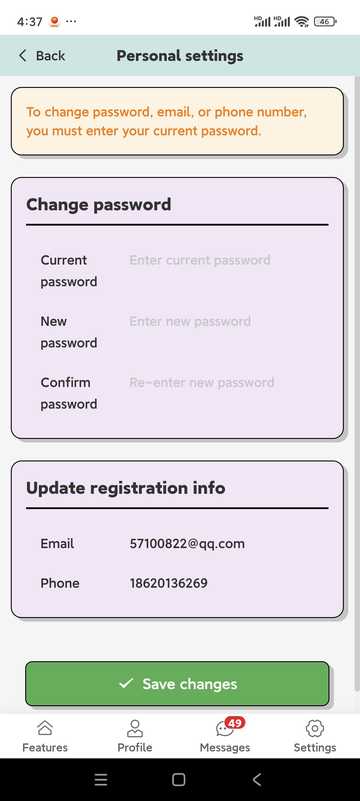
- 密码一般for 6 位以上字母+数字(以 APP 提示for准)
- Pengguna di tanah besar China mesti memastikan bahawa nombor telefon mereka betul untuk mendapatkan semula kata laluan; pengguna di negara dan rantau lain mesti memastikan bahawa alamat e-mel mereka betul
Message center
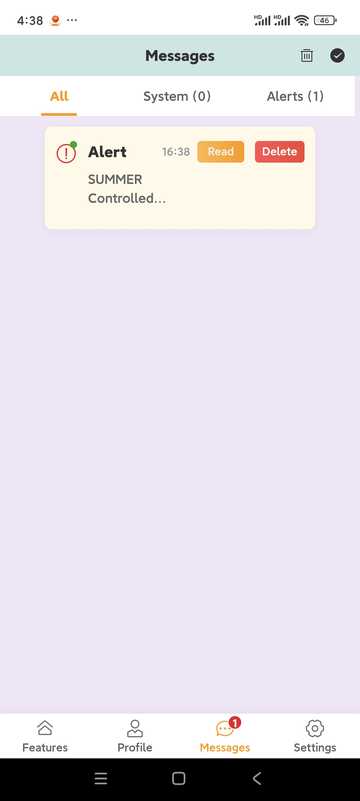
- 接收 PC 端管控事件提醒(若已开启截图推送等)
- 系统公告与通知
Seting Tidak Sesuai Di Tempat Lain
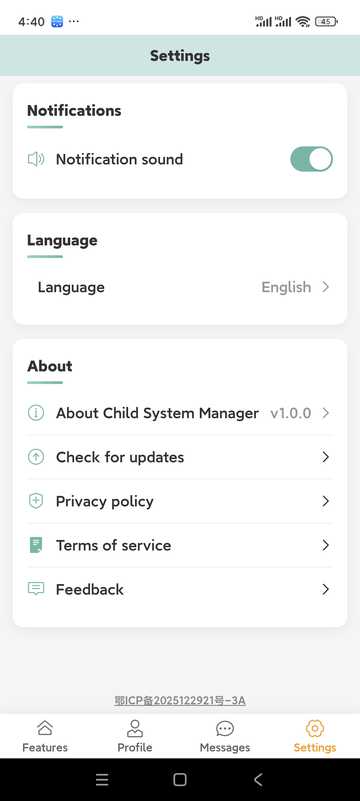
- 告警到达时是no播放提示音
- Penukaran berbilang bahasa
- Semak kemas kini
- 意见反馈入口
8. Tips · Precautions · APP FAQs
Tip penggunaan
- Semak statistik penggunaan secara kerap dan laraskan peraturan dengan anak anda
- Time limits are recommended to be implemented step by step and communicated in advance
- 养成查看Message center的习惯,及时处理异常
- 请在合法合规与被监护人知情前提下使用
- Keep your account password safe
- Keep the APP and PC versions up to date
APP FAQ
- Bagaimana caranya untuk menambah peranti?
- Home「添加设备」,按绑定码在电脑端完成配对;电脑需已安装 PC 端。
- 设备离线?
- Check whether the computer network, power supply and PC are running; if intercepted by anti-virus software, please allow it in the anti-virus software.
- Terlupa kata laluan anda?
- Gunakan "Terlupa kata laluan" pada halaman log masuk untuk menetapkan semula melalui nombor telefon atau e-mel.
- Keahlian vs Percubaan?
- Trial and membership rules will be marked in the software; after expiration, some remote setting capabilities may be limited, please refer to the prompts in the APP.
Penyelesaian masalah
Soalan biasa dan penyelesaian
Punca yang mungkin:
- Kerosakan sistem pengendalian
- Perisian anti-virus rosak. Perisian ini telah diuji oleh 10 perisian anti-virus utama di dunia, tetapi semua perisian anti-virus atau versi berikutnya tidak dijamin serasi.
- Isu keserasian sistem Perisian ini menyokong sistem operasi Windows 10 64-bit, tetapi tidak menjamin bahawa semua sistem operasi Windows 10 64-bit akan serasi.
Penyelesaian:
- Add a whitelist to the anti-virus software, or update the anti-virus software to the latest version
- Check the system version compatibility. If the system version is not supported, please upgrade the operating system to the latest version.
- 不要犹豫,Contact Us获取帮助!
Punca yang mungkin:
- Network connection issues
- Maklumat akaun salah
- Aplikasi PC tidak berjalan dengan betul
Penyelesaian:
- Semak sambungan rangkaian
- Sahkan maklumat akaun adalah betul
- Mulakan semula aplikasi PC
Punca yang mungkin:
- Perubahan nama program permainan
- New game is not in the database
- Settings are too strict
Penyelesaian:
- Tambah program permainan secara manual
- Kemas kini perisian
- Laraskan tetapan pengesanan
FAQ
FAQ
- Lihat panduan ini
- Lawati Pusat Bantuan
- Hantar e-mel kepada service@stellarorigin.com
- Add WeChat: stellarorigin
- QQ:57100822