
Time Management
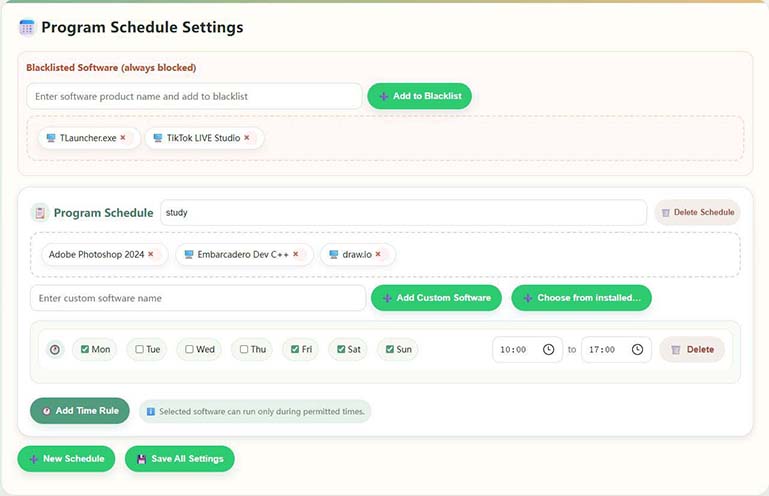
Fungsi pengurusan jadual komputer yang kuat, menyokong berbilang jadual, berbilang jam sehari untuk menentukan masa yang boleh menggunakan komputer
Berikan skrin utama anda sedikit lebih lembut
A computer usage management tool for families: Helps you and your children make appointments together and stay away from addictive games and bad websites; direct point-to-point connection between mobile phone and computer, less interruption and more peace of mind.
Kedudukan produk:Sistem pengurusan komputer anti ketagihan untuk remaja anak biri-biri adalah alat pengurusan penggunaan komputer untuk senario keluarga, yang membantu ibu bapa mengawal masa, permainan dan laman web kanak-kanak di bawah umur menggunakan komputer, dan menyokong peringatan jauh.
Platforms & access:Provides Windows control terminal and Android parent terminal; download and version instructions can be found on this website Download page, see graphic tutorial Guide。
什么软件可以防止儿童、小孩沉迷电脑游戏、上网?Little Lamb Youth Anti-Addiction PC Management可以轻松帮助家长管理小孩、青少年合理使用电脑,防止沉迷游戏或上网,软件一键式管理,AI识别游戏行for。
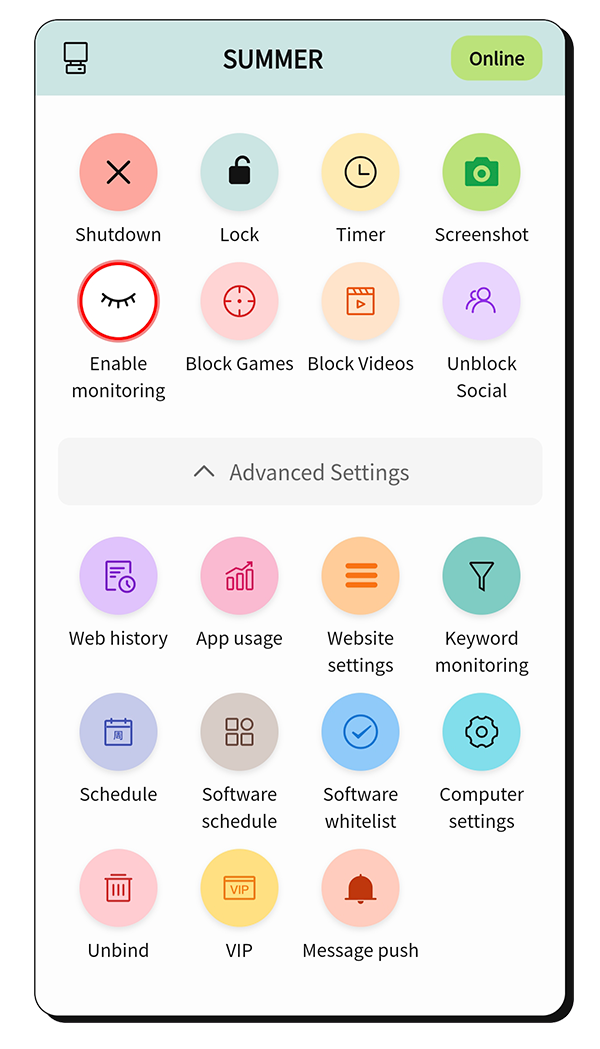
像家里多一位耐心的「时间管家」
Fungsi pengurusan jadual komputer yang kuat, menyokong berbilang jadual, berbilang jam sehari untuk menentukan masa yang boleh menggunakan komputer
Kenal pasti permainan melalui kata kunci, penggunaan perkakasan komputer, dan analisis tingkah laku, kemudian ambil tindakan kawalan tepat pada masanya
Capai komunikasi langsung titik-ke-titik antara terminal mudah alih dan terminal desktop, dan ikuti perkembangan dan pantau penggunaan PC
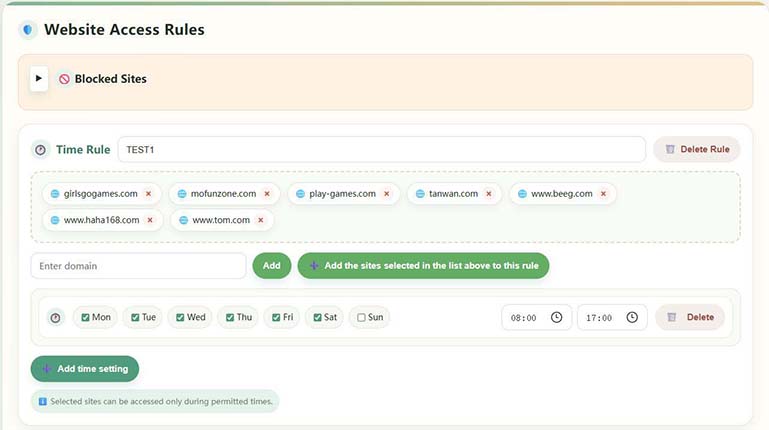
Domain management lets you allow sites only during permitted times or block specific sites directly
Menjana laporan penggunaan terperinci untuk memahami tabiat penggunaan kanak-kanak dan membantu membuat rancangan penggunaan adil
PC dan telefon menyambung peer-to-peer. Pelayan hanya membantu memadankan sambungan. Penghantaran terenkripsi melindungi semua data dan privasi.
Serahkan kerumitan kepada kami dan kesederhanaan kepada setiap hari
Kenal pasti permainan dan kandungan berbahaya dari pelbagai dimensi:
Lebih banyak kawalan dan butiran Sila pasang pengalaman perisian, anda boleh memilih strategi yang lebih lembut atau lebih ketat mengikut situasi keluarga anda. Bagi ibu bapa yang tidak biasa dengan operasi komputer, adalah disyorkan untuk menggunakan terminal mudah alih untuk pengurusan.
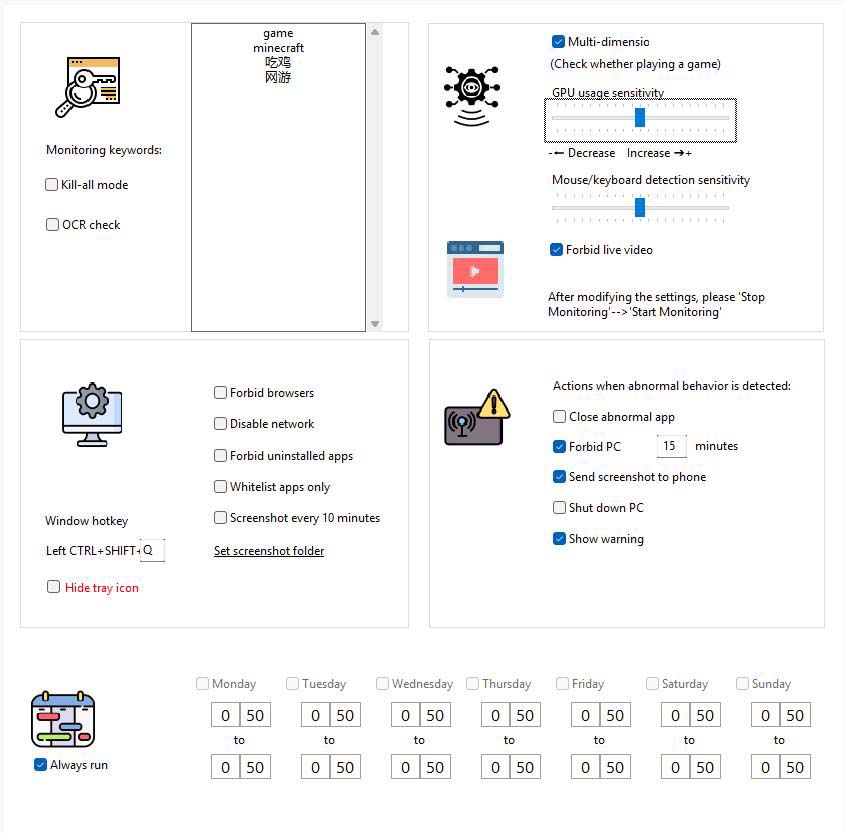
Flexible time control features:
Alami lebih banyak ciri secara langsung
Comprehensive web access control:
Mudah dan telus: 6 bulan 88 元, one year 158 元,3 years 258 元
$13.42 USD
Sesuai untuk keluarga yang mengalami kesan secara langsung
$24.10 USD
Pilihan tanpa bimbang untuk kebanyakan keluarga
$39.36 USD
Long-term protection, more cost-effective unit price
Sila buat pembelian keahlian dalam perisian, klik "Maklumat VIP" pada terminal mudah alih, dan klik "Pembelian VIP" pada komputer kanak-kanak. Jika harga diselaraskan, halaman pembelian akan diguna pakai.
Mula-mula pasang "Apl Kanak-Kanak" pada komputer Windows anak anda, dan kemudian pasang "Apl Ibu Bapa" pada peranti anda sendiri. Arahan penuh dan muat turun berbilang platform tersedia pada halaman muat turun.
View download and installation instructionsSome feedback from real families
"Perisian ini sangat hebat! Kanak-kanak kini kurang menghabiskan masa bermain dan belajar dengan lebih cekap. Aplikasi mudah alih ini sangat mudah, dan anda boleh memeriksa keadaan kanak-kanak pada bila-bila masa."
"Ciri pengurusan masa sangat praktikal — ia mengawal masa komputer dengan tepat. Penapisan web juga berkuasa dan menjauhkan kanak-kanak daripada tapak berbahaya."
"The interface is friendly and easy to use. Remote monitoring gives me peace of mind when I'm away — I get notified immediately when my child starts gaming."
Beberapa soalan kecil semasa pemasangan dan penggunaan